
1-Visitor
January 11, 2016
Solved

Is it possible to reference these 3 holes about this large center hole?

  • January 11, 2016
  • 4 replies
  • 1932 views

I'm working in Creo Parametric 2.0. With the picture presented, is it possible to make those three smaller holes use the larger center hole as reference, so if I want to move that center hole, the rest move with it? I'm using the Hole feature, not just extrude-cutting three holes through the surface.
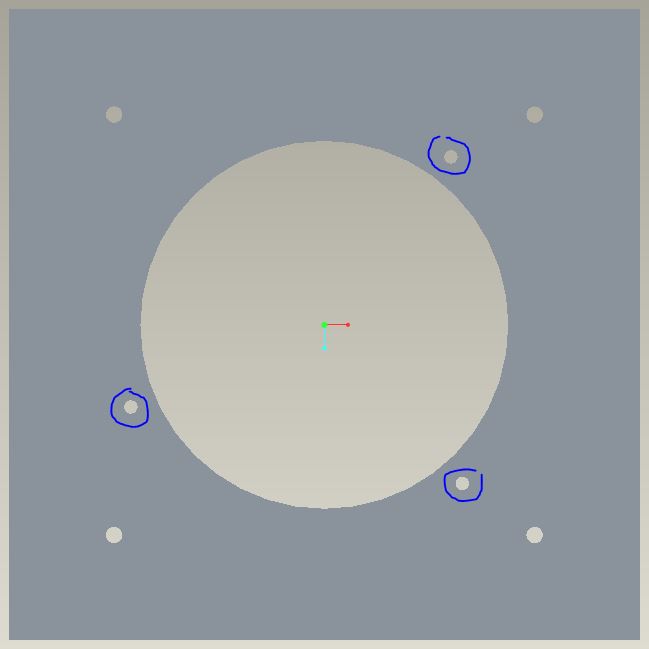
Fixture.JPG


This thread is inactive and closed by the PTC Community Management Team. If you would like to provide a reply and re-open this thread, please notify the moderator and reference the thread. You may also use "Start a topic" button to ask a new question. Please be sure to include what version of the PTC product you are using so another community member knowledgeable about your version may be able to assist.
Best answer by TomD.inPDX

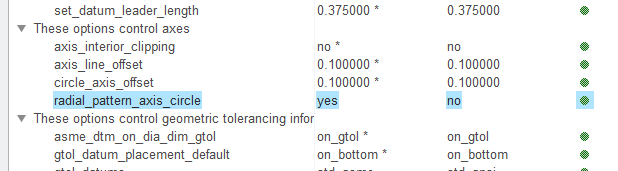
The concept is that you want to place the hole radially about the center hole's centerline (angle and diameter).  After that, you can pattern the other 2 holes.  I recommend this as this is how you can get a radial bolt pattern centerlines to show up in drawings... but you also have to enable that in Detail options:

4 replies

1-Visitor
January 11, 2016

Here file you need. Try to see if it works as you want.

17-Peridot
January 12, 2016

The concept is that you want to place the hole radially about the center hole's centerline (angle and diameter).  After that, you can pattern the other 2 holes.  I recommend this as this is how you can get a radial bolt pattern centerlines to show up in drawings... but you also have to enable that in Detail options:

jhorst1-VisitorAuthor
1-Visitor
January 12, 2016

That's pretty much exactly what I was looking for, thanks! It did the trick.

17-Peridot
January 12, 2016

Happy to help, James.