

12-Amethyst
December 14, 2018
Solved

Is there a way to see which revision iteration/versions of the components are in an assembly?

  • December 14, 2018
  • 4 replies
  • 2745 views

When I open my assembly, at the top it tells me the revision and iteration of the assembly (ex: A.4).  Is there a way to see what the revision and iteration of the components in that assembly without opening the components individually??  I realize that by default, the most current version of each component is pulled from Windchill.  I would like the be able to see it though. 


Using Creo 2.0, Windchill 10.2


Best answer by TomU

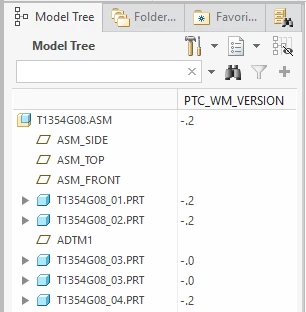
Under tree columns, choose 'Database Params' for from the dropdown and then choose 'PTC_WM_VERSION'.


PTC_WM_VERSION.PNG

4 replies

23-Emerald IV
December 14, 2018

You should be able to add the Windchill parameters for those values to your tree columns in Creo.

TomU23-Emerald IVAnswer
23-Emerald IV
December 14, 2018

Under tree columns, choose 'Database Params' for from the dropdown and then choose 'PTC_WM_VERSION'.


PTC_WM_VERSION.PNG

BriGuy12-AmethystAuthor
12-Amethyst
December 14, 2018

You know I've been using Creo for over 10 years and I never noticed the drop down for Type.  Thanks!!

23-Emerald III
December 14, 2018

Remember, the database parameters are only there if you are using Windchill. If you use Creo without Windchill, then you have to manually control the revision with a drawing/model parameter.