

Solved
ISO Tolerance display font size for Limits in drawings
Hi CREO experts,
I'm setting up new templates for my company and now I'm stuck with a font size problem probably refering to a din.dtl option. (CREO 9.0)
We're using ISO Tolerance tables for shafts and holes and there is one problem with the display of the tolerances.
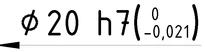
I've set the tol_text_height_factor to 0.5. That works for all +/- tolerances, but not the limits. (see attached file)
PlusMinus:
Limits:
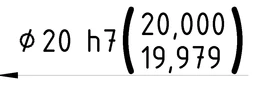
As you can see the font size in the "Limit" display in the brackets is 1.0 but I want to have it 0.5 like in the "PlusMinus"
Does anyone know the din.dtl or config.pro option to have the "Limits" display style the same as "Plus Minus"?
Thanks in advance