

3-Newcomer
March 3, 2026
Solved

Isometric Orient View with Z axis at the top

  • March 3, 2026
  • 1 reply
  • 157 views
I am using Creo Parametric Release 12.4 and Datecode12.4.0.0

I would like to create a new oriented view with an isometric orientation.
Currently, the default Isometric view has the Y‑axis along the upper side.
I want to rotate it so that the Z‑axis is along the upper side instead
Best answer by tbraxton

Refer to the solution in this thread for details on the angles required for orientation:

 https://community.ptc.com/t5/3D-Part-Assembly-Design/Iso-views-based-on-Default-Orientation/m-p/924392 


See my post with the values to get Isometric projection relative to current view; TLDR

ISOMETRIC (proportion of the three sides is 1:1:1):
The horiz. angle should be the ArcSin of (1/(Sqrt(3))) = 35.26439 degrees
This is equal to ArcSin of Tan(30).
Due to rounding errors in Pro/E you can better use the value: 35.26379


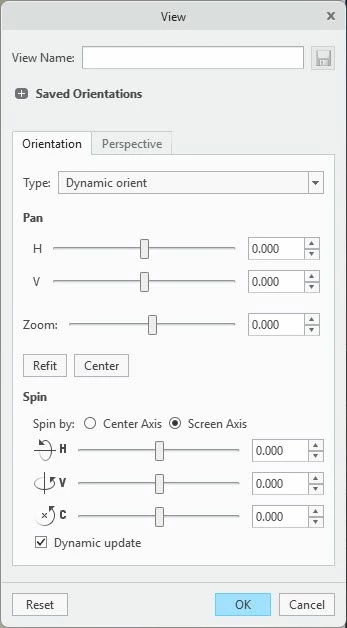
Orient your model in an orthographic view with the desired axis orientation. Use view dynamic orient to put the model in ISO view and then save the view.


2026-03-03_11-10-49.jpg

1 reply

tbraxton22-Sapphire IIAnswer
22-Sapphire II
March 3, 2026

Refer to the solution in this thread for details on the angles required for orientation:

 https://community.ptc.com/t5/3D-Part-Assembly-Design/Iso-views-based-on-Default-Orientation/m-p/924392 


See my post with the values to get Isometric projection relative to current view; TLDR

ISOMETRIC (proportion of the three sides is 1:1:1):
The horiz. angle should be the ArcSin of (1/(Sqrt(3))) = 35.26439 degrees
This is equal to ArcSin of Tan(30).
Due to rounding errors in Pro/E you can better use the value: 35.26379


Orient your model in an orthographic view with the desired axis orientation. Use view dynamic orient to put the model in ISO view and then save the view.


2026-03-03_11-10-49.jpg