14-Alexandrite
August 2, 2023
Solved

Issue creating a wrap

  • August 2, 2023
  • 3 replies
  • 4923 views

I want to create a quilt and then wrap a sketch around said quilt. 

To do this, I create a circle with diameter 360/pi and then extrude the sketch to 250. I create a sketch of a rectangle with height matching the extrusion and width 72. If I set the width to be 80 the wrap is successful but if I put the width to be 72 it fails. I have no idea why and would appreciate all help.


I am using Creo parametric 9.0 Student version.

Best answer by kdirth

I would guess the issue is related to part of your sketch being on the very edge of the surface you are projecting onto.  As @MartinHanak indicated the entire sketch must lie within the surface.  The model has a level of accuracy that can cause an issue when you are defining the sketch to extend to the edge of the surface.  the copy of surfaces may also be contributing to the error.


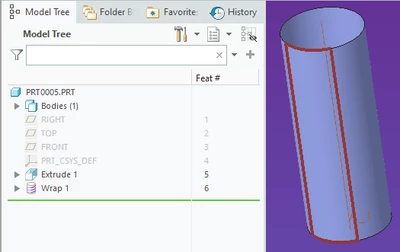
On another note, I know you are a student, but this is a two feature curve created with 9 features.  Extrude the cylinder as a surface with an internal sketch and wrap an internal sketch from the front datum plane.  No need to copy surfaces and remove solids.

kdirth_0-1690980479710.png

Creo 7 file attached.

3 replies

14-Alexandrite
August 2, 2023

The sketch.

IbrahimTayyab_0-1690970029435.png

The wrap error.

IbrahimTayyab_1-1690970063464.png

Same wrap working when I set the width to be 80 instead.

IbrahimTayyab_2-1690970128854.png


kdirth
kdirth21-Topaz IAnswer
21-Topaz I
August 2, 2023

I would guess the issue is related to part of your sketch being on the very edge of the surface you are projecting onto.  As @MartinHanak indicated the entire sketch must lie within the surface.  The model has a level of accuracy that can cause an issue when you are defining the sketch to extend to the edge of the surface.  the copy of surfaces may also be contributing to the error.


On another note, I know you are a student, but this is a two feature curve created with 9 features.  Extrude the cylinder as a surface with an internal sketch and wrap an internal sketch from the front datum plane.  No need to copy surfaces and remove solids.

kdirth_0-1690980479710.png

Creo 7 file attached.

There is always more to learn.
14-Alexandrite
August 2, 2023

Oh i never realised there was an option to extrude as a surface, that is so helpful. I just  burst out laughing when I realised this, thank you very much.

14-Alexandrite
August 2, 2023

When I started the process in a new part it behaved as expected. I am not sure what caused this behaviour, I will try to recreate it in a new part.

24-Ruby III
August 2, 2023

@IbrahimTayyab wrote:

I have recorded a video of me creating the wrap in real time. I used the following relations:

Perimeter=360
radius=perimeter/2/pi
diameter=2*radius
extrude=300
width=72

Kindly let me know what I am doing wrong.


Hi,

wrapped curve must lie inside surface.

14-Alexandrite
August 2, 2023

I am not sure I follow in the first sketch the height was constrained by the end references while in the second sketch the wrap failed when the sketch height was 300 same as the extrude

24-Ruby III
August 2, 2023

@IbrahimTayyab wrote:

I am not sure I follow in the first sketch the height was constrained by the end references while in the second sketch the wrap failed when the sketch height was 300 same as the extrude


Hi,

I apologize ... unfortunately I can't test all your attempts. I give up.

StephenW
23-Emerald III
August 2, 2023

This may be an accuracy issue. Go to file prepare model properties, then change the accuracy to the smallest number it will let you.

You should be set to absolute accuracy also.

StephenW
23-Emerald III
August 2, 2023

No matter my construction method of the geometry, I could not make it fail like it did on your geometry, unless I went over 300 on the height, which makes sense.

kdirth
21-Topaz I
August 2, 2023

I was able to get a failure only when using copied surfaces and some widths worked and some didn't.  If I extruded a cylindrical surface and wrapped it, it worked for all widths.

Creo 7.0.11.0, absolute 0.001,  mmKs

There is always more to learn.
14-Alexandrite
August 2, 2023

Thanks for all your help, I think it will be resolved when I implement kidrth and stephenw's solution of extruding as a surface and checking the accuracy.