
15-Moonstone
November 17, 2021
Solved

It is possible to delete all information provided by the command "File History"?

  • November 17, 2021
  • 1 reply
  • 1085 views

Hello,
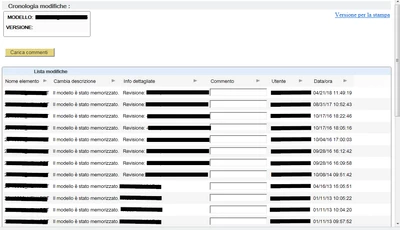
I would like to know if anyone knows a command or a way to clear all the information provided by the "File History" command, in italian "Cronologia file".
(Tools> Investigate> File History).
I would like to cancel to avoid unnecessarily sending information such as users, hosts, dates, etc ...
I am attaching an image to be clearer.
bmancini_0-1637167706686.png

Thank you.

Best answer by KenFarley

There is a hidden config.pro option that will delete all the history when you do a "save a copy" operation:

purge_history_on_save_copy yes

Because it's hidden, it's kind of risky to use, or it might disappear in a future release, but it's pretty useful.

1 reply

KenFarley
KenFarley21-Topaz IIAnswer
21-Topaz II
November 17, 2021

There is a hidden config.pro option that will delete all the history when you do a "save a copy" operation:

purge_history_on_save_copy yes

Because it's hidden, it's kind of risky to use, or it might disappear in a future release, but it's pretty useful.

bmancini15-MoonstoneAuthor
15-Moonstone
November 19, 2021

Thanks KenFarley.
I accept the solution.
Although I would have liked to wait if some other user could give me another solution.
