


HamsterNL
18-Opal
November 29, 2017
Solved

Keeping Up Appearances

  • November 29, 2017
  • 14 replies
  • 6233 views

Currently, our parts have all kinds of pretty colors, to distinguish the different parts.

So we have light brown, brown, dark brawn, orange, dark orange, etc.


But we are also looking into bringing our models into the real world with Augmented Reality. For this, I would like to give our parts a more realistic look, so brushed aluminium instead of the dark brown.


I would like to define those looks at part-level, not at assembly-level.


So, my questions are...

Can a part have multiple appearances? (for example, (1) bright red and (2) brushed aluminium)

At assembly-level, can I create a "Rule Based" appearance which will "activate" the realistic look of the parts? (so I can switch easily between the pretty engineering colors, and the realistic look)
Best answer by Domen_130833

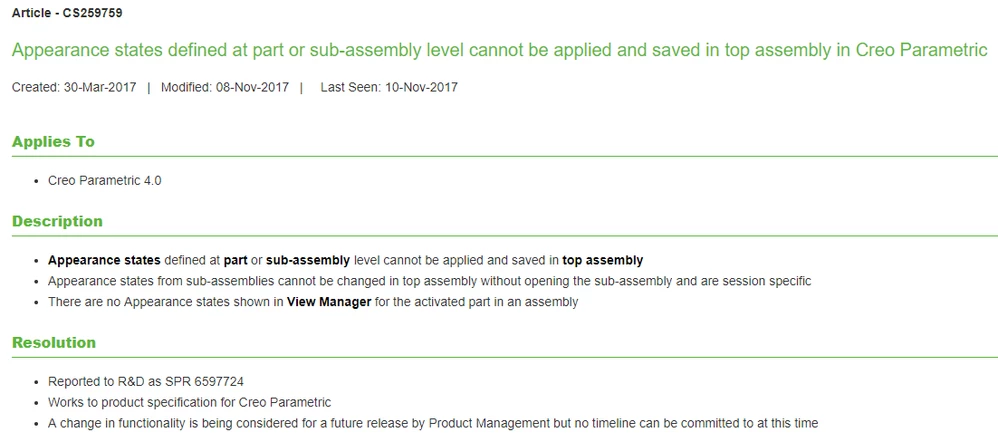
This is not possible in Creo 4.0.

SPR was opened: https://support.ptc.com/appserver/cs/view/spr.jsp?n=6597724

And also article below:

image.png


Regards,

Domen

14 replies

23-Emerald III
November 29, 2017

You could set up family tables for your parts that have different colors. Wouldn't each color be a different part number? When I did air bags, each color was a different dash number for inventory purposes as well as MRP scheduling for production.


Not sure why you would need to switch colors, there is no difference in rendering time. You could possible do it with a parameter setting and a relation.


HamsterNL
HamsterNL18-OpalAuthor
18-Opal
November 29, 2017

The colors that we now apply do not reflect the actual colors of the components(*). We have "randomly" given them different colors to distinguish them.


Imagine a wall made of sheetmetal louvers. The louvers have 5 different lengths. In real life, those louvers would all get the same color (RAL number to the client wishes), but our 3D model has 5 different colors to easily tell them apart.


Let's call the model with the 5 different colors our "engineering model". 


If I would export the "engineering model", I would also get those 5 different colors in my Augmented Reality model. But I don't want that. For the AR experience, I would like to give those parts all the same look...brushed aluminium.


Now I could apply the brushed aluminium to all the parts from my assembly-level...but I rather would like to apply the brushed aluminium look at part-level.


So, in short, we work in the "engineering model" with those 5 different colors, but for the AR export I would like the easily switch to a more realistic look for the components.


(*) If a component is available in multiple colors, and thus needs to have a unique part number, then I would create a family table which drives the color and part number.

StephenW
23-Emerald III
November 29, 2017

It's would be highly useful to be able to do something like this. For years and years I've made parts all different colors so I could differentiate the individual components while working/designing/reviewing. Then, when it comes time to make some marketing images, it takes a substantial effort to re-color the model to make it presentable.

I was told one time by a manager who was presenting my images that he didn't like my Partridge Family bus image of the construction equipment we were selling.  Yup, that's what my models looked like...


partrdge.jpg

23-Emerald IV
November 29, 2017

Each successive level up can have their own colors defined for each of the components, but I don't think it's possible to have multiple colors for the same component at the same level.


Part --> Red

   Assembly --> Brown

      Assembly --> Silver


Have you considered placing your top level assembly into another "wrapper" assembly that is just used for coloring things?

Colors.PNG


KenFarley
21-Topaz II
November 29, 2017

This harkens back to a complaint I've made forever. You can't set up a family table that specifies a color for a particular instance. For example, die springs are often identified with a specific color (heavy = red, medium = blue, light = green, etc). I can make a model that will provide me with whatever spring I need, but I can't specify its color based on whether it's a heavy, etc. Similarly, I'd like to be able to distinguish between black oxide, stainless, zinc plated or whatever screws in an assembly. I've heard the "trick" of using surface(s) that impart a color on the model, but that's just going to make the family table a mess.

23-Emerald III
November 29, 2017

The key is setting up your family tables.

For springs, set one for medium with its sizes/color and another for heavy with its sizes/color.

I have set up many family tables by material since thatis a property that cannot be changed by the FT.

Set up steel washers and then copy to stainless steel-316 and copy that to stainless Steel-178ph. Since we reference 2 vendors in our files each washer has a unique part number.

Set your springs with the same criteria. You should have an internal part number for each spring as well as a reference to our vendor's part number for each one.


Also, by making one family table and then copying it make the next, all the parts will mate becasue they all orginate from the same references.

KenFarley
21-Topaz II
November 30, 2017

I have lots of family tables for parts, particularly "catalog" items like springs, screws, etc. Part names are as descriptive as possible, i.e. "BHCS-0250-20x1000-BLKOX". The problem is that in the version of Creo I'm using, 2.0, color is not something that can be set in the family table. At least that is to the best of my knowledge. If there is some way to do so, I'd like to know what it is.