
10-Marble
January 15, 2026
Solved

Lag/delay when zoomed into model

  • January 15, 2026
  • 3 replies
  • 59 views

When zoomed into my model, I am noticing significant lag when panning, rotating, and trying to sketch. I did not see this issue previously when using 11. I updated to 12 due to an update of my graphics card but I am still editing a file created in 11. 
I haven't used Creo in a while, but I don't remember it being like this.
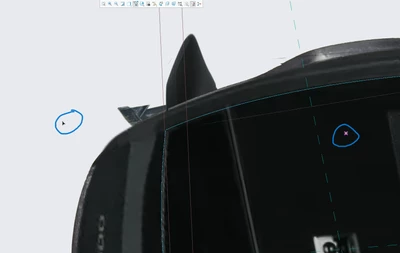
BA_11575238_0-1768452828123.png

The image shows how far away my sketch cursor is from my mouse. After a bit the sketch cursor catches up. Is this behavior normal?

Best answer by BA_11575238

I was able to figure out a workaround/fix. The issue is caused by some sort of issue with Creo's opengl with my graphics card. It is not clear to me why there is an issue as all my testing indicates that my graphics card and drivers can run the latest opengl version.


To overcome this, I set these values in the configuration file:
graphics opengl
use_software_opengl no
ENABLE_OPENGL_DEBUGGING yes
ENABLE_OPENGL_FBO yes
ENABLE_OPENGL_SHADER no
ENABLE_OPENGL_VBO yes


The most critical of these being ENABLE_OPENGL_SHADER set to no. The description of this is: "Enable advanced OpenGL capabilities including HDR lighting, Ambient Occlusion and Order Independent Transparency". In the 3D workspace, disabling this reduces the quality of graphics, but at least the lag is gone, which I think is better than nothing,

3 replies

Catalina
Community Moderator
January 21, 2026

Hi @BA_11575238 

Thank you for your question. 

Your post appears well documented but has not yet received any response. I am replying to raise awareness. Hopefully, another community member will be able to help.

Also, feel free to add any additional information you think might be relevant.


Best regards,

Catalina | PTC Community Moderator
10-Marble
February 5, 2026

I found that the issue is related to the presence of reference images... 

When navigating or sketching with a reference image present on the 3d view, it adds a delay to my inputs.

BA_1157523810-MarbleAuthorAnswer
10-Marble
February 5, 2026

I was able to figure out a workaround/fix. The issue is caused by some sort of issue with Creo's opengl with my graphics card. It is not clear to me why there is an issue as all my testing indicates that my graphics card and drivers can run the latest opengl version.


To overcome this, I set these values in the configuration file:
graphics opengl
use_software_opengl no
ENABLE_OPENGL_DEBUGGING yes
ENABLE_OPENGL_FBO yes
ENABLE_OPENGL_SHADER no
ENABLE_OPENGL_VBO yes


The most critical of these being ENABLE_OPENGL_SHADER set to no. The description of this is: "Enable advanced OpenGL capabilities including HDR lighting, Ambient Occlusion and Order Independent Transparency". In the 3D workspace, disabling this reduces the quality of graphics, but at least the lag is gone, which I think is better than nothing,