

1-Visitor
July 15, 2016
Solved

Layer problem in Drawing in Creo 2.0.

  • July 15, 2016
  • 7 replies
  • 4833 views

Layer of views is not showing in layer tree by the selection of active layer object selection.

for more hint please the attachment.


Thanks in Advance

Sachin


This thread is inactive and closed by the PTC Community Management Team. If you would like to provide a reply and re-open this thread, please notify the moderator and reference the thread. You may also use "Start a topic" button to ask a new question. Please be sure to include what version of the PTC product you are using so another community member knowledgeable about your version may be able to assist.
Best answer by MartinHanak

Hi,

  1. activate Layer tree
  2. click Setting button and then Drawing Layer Status command from context menu
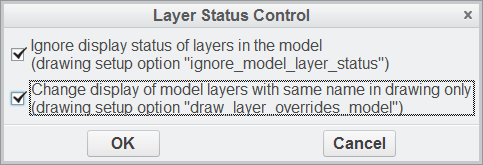
  3. check both options (see picture below)
  4. click arrow button and select any drawing view
  5. expand view list ... now you can see views, too

layer.png

MH

7 replies

StephenW
23-Emerald III
July 15, 2016

What exactly are you asking? When you use the selection arrow, that allows on-screen selection.

When you use the drop down arrow, then you see the views.

ssharma-61-VisitorAuthor
1-Visitor
July 15, 2016

When I use drop down arrow, then display assembly's views name only. There is no drawing view name like bottom_4, left_12 etc.

kdirth
21-Topaz I
July 15, 2016

May be a very old drawing or copied from an old one.  I happened to pull up a drawing redrawn in ProE in 2004 and saw the same thing.  Pulling up a drawing created this year it worked as expected.

There is always more to learn.
kdirth
21-Topaz I
July 15, 2016

The only way I found to get the views to show up was to add a new view and delete it.  Somehow this triggered the views to be added to the layer tree.

There is always more to learn.
24-Ruby III
July 18, 2016

Hi,

  1. activate Layer tree
  2. click Setting button and then Drawing Layer Status command from context menu
  3. check both options (see picture below)
  4. click arrow button and select any drawing view
  5. expand view list ... now you can see views, too

layer.png

MH

ssharma-61-VisitorAuthor
1-Visitor
July 20, 2016

Thanks Martin

This is right way

Dale_Rosema
23-Emerald IV
July 20, 2016

If Martin's answer was correct, don't forget to mark it for those who may search on this topic later.