
12-Amethyst
December 2, 2024
Solved

Layers Not Working

  • December 2, 2024
  • 2 replies
  • 1932 views

I'm using creo 10.0.2.0. I can't get basic layers to work consistently and am not sure why... So, I created a sketch in the model. I want to show up in my drawing, but be hidden in the model. So first, I create a layer called CS_Measurement and add the sketch to it. Then I hide it in the model. Then i go to my drawing. I select my Left_10 view so i can control that view independent of all else. I click on CS_Measurement, and the red dotted line appears as a preview. Then I right click on CS_Measurement so I can unhide the sketch, but...... Apparently it's already unhidden because it gives me the "Hide" command only... Except it's not unhidden because it's not showing up in yellow like it should when i click away.
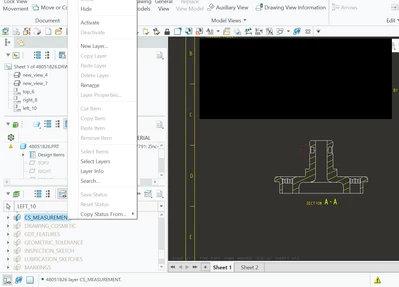
JR_10680659_1-1733170757985.png

so maybe i have to expand the CS_Measurement layer and unhide the sketch itself. However, the only option presented is "Unhide in Model". But I don't want to do that... I just want to unhide in that drawing view
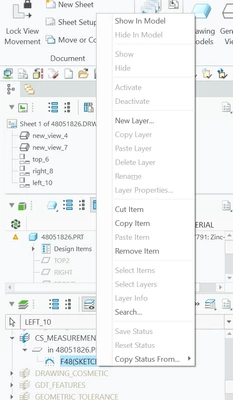
JR_10680659_2-1733170970744.png


every now and then, ill try unhiding some things, re-hiding other things, and randomly get it to work, but this is a very common occurrence i keep finding in creo...

Best answer by JR_10680659

Good catch. #1 did help some, but did not resolve the issue completely. I also tried #3 and it's giving me the same issues as the sketch and cosmetic sketches I've tried. It was a good idea though. It could be something with my config files. I'm going to escalate a ticket to PTC. Thanks for the help though.

2 replies

tbraxton
22-Sapphire II
22-Sapphire II
December 2, 2024

Features can be hidden independent of layer settings. The items added to the layer (sketch feature vs curves of the sketch) will behave differently when hiding layers. Try adding the curves generated by the sketch to the layer and not the feature and then try using the layer in the drawing view.


tbraxton_0-1733172100887.png

tbraxton_1-1733172110690.png


12-Amethyst
December 2, 2024

okay, it was like you thought, i had the sketch selected instead of the curve. so i followed your steps. still no luck.

JR_10680659_0-1733173346808.pngJR_10680659_1-1733173357611.pngJR_10680659_2-1733173367784.png


JR_10680659_3-1733173378163.png


tbraxton
22-Sapphire II
22-Sapphire II
December 2, 2024

Without access to your models, it is hard to debug it quickly. There is one thing you can try which is remove the section from view left_10 and see if the behavior changes when hiding the layer. This is just a test to see if the section is affecting what is displayed.

12-Amethyst
December 2, 2024

I've had this problem in the past in earlier Creo versions.  I don't know the full solution, however @tbraxton is on the right path because sections often create issues with the view display.


Some things that have helped me in the past are:

1.  Put your sketch on a plane that is not the same as the section.  Yeah, I know, but sometimes things on the same plane are interpreted as needing to be cut away and they won't show.

2.  Use a wireframe view display.  Sometimes that is not practical, but change it to wireframe and see if the sketch appears.  It will help diagnose.

3.  Make a surface extrude of your sketch.  It will interpret the 3D geometry different than the 2D with respect to the section plane.  Obviously you will need to manage it with layers.

4.  The worst idea of all - if the sketch shows in Wireframe without the section, you can use edge in a drawing sketch, then bring the section back.  It won't update with the model, but in a pinch, you can make it display as you need.


Good luck.  It is never as easy as it should be.

JR_1068065912-AmethystAuthorAnswer
12-Amethyst
December 6, 2024

Good catch. #1 did help some, but did not resolve the issue completely. I also tried #3 and it's giving me the same issues as the sketch and cosmetic sketches I've tried. It was a good idea though. It could be something with my config files. I'm going to escalate a ticket to PTC. Thanks for the help though.