
1-Visitor
July 1, 2013
Solved

Limit dimensions unable to edit Tolerance limits

  • July 1, 2013
  • 5 replies
  • 31442 views

Hi

I am having problems with limit dimensions I wish to be able to set upper and lower limits in the dimension but the option to allow me to edit this is greyed out.

I have taken the time to read a few posts so I know about changing

tol-display to yes in drawing options

I have also changed

Tools > options > tolerance_standard to ISO

I am just a bit lost where to go from here.

Thx.
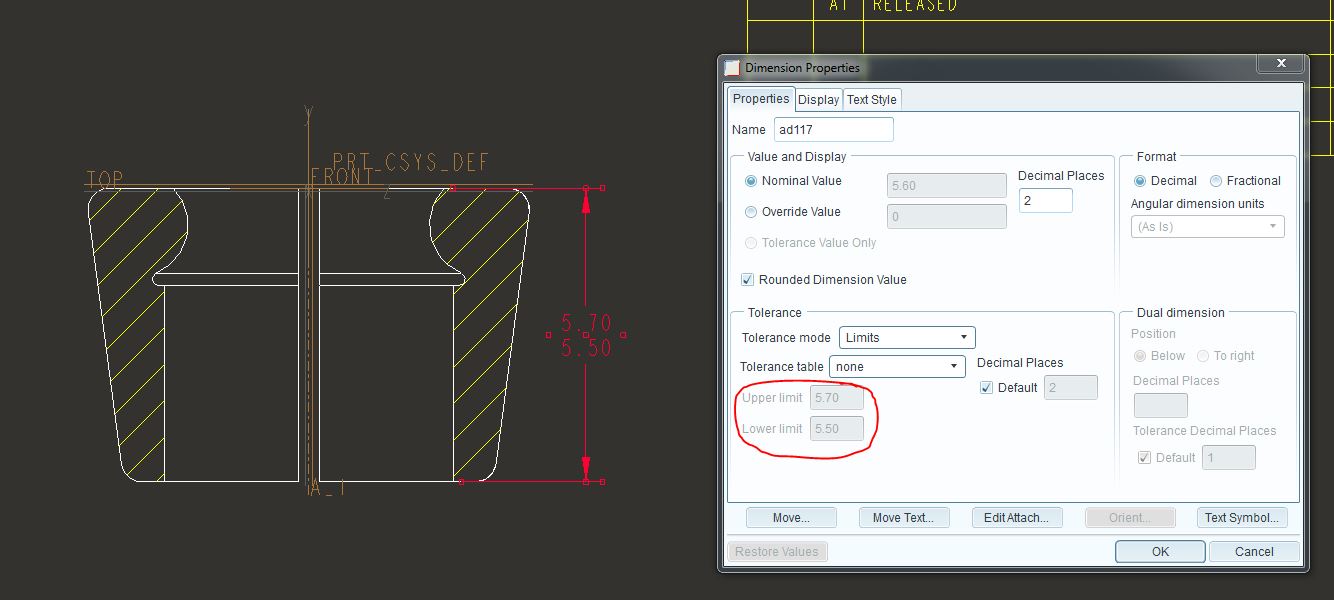
Capture.JPGHope you can help.

Best answer by ptc-5008082

I think that it is because it is an 'added' or 'driven' dimension, you should be able to enter the limts required in plus-minus mode and it will display correctly when you go to nominal.

If you use a 'shown' or 'driving' dimension you will be able to enter the limit tolerances directly.

If you are using limit tolerances you might also want to visit the config.pro option maintain_limit_tol_nominal - the default is no

5 replies

1-Visitor
July 1, 2013

I think that it is because it is an 'added' or 'driven' dimension, you should be able to enter the limts required in plus-minus mode and it will display correctly when you go to nominal.

If you use a 'shown' or 'driving' dimension you will be able to enter the limit tolerances directly.

If you are using limit tolerances you might also want to visit the config.pro option maintain_limit_tol_nominal - the default is no

12-Amethyst
July 1, 2013

Hello,

I think it comes from:

A) TOLERANCES_TABLE_DIR config options OR if you didn´t specify check

B) start parts

Check FILE - PREPARE - MODEL PROPERTIES - TOLERANCES (click on change) - popup menu apears - click TOL TABLES - MODIFY VALUE - GENERAL DIMMENSIONS

Here you can see and set table with generall tolerances (tolerances for unteleranted dimmensions), for shaft and holes...

In drawing mode try different TOLERANCES MODE (switch limits to plus/minus) - TOLERANCES TABLE = none, than you can write your own tolerance.

1-Visitor
October 23, 2017

Hi,

I've added several settings to my config.pro but I still have to go to Files->Prepare->Detail Properties->Details

and change "tol_display' to yes.

I've attached my config.

Could you take a look and let me know what I'm missing or not doing correctly?

I have tol_display yes and and the tolerance_table_dir set with directory location.

I have an inch and metric config. The inch is attached.


Thank you,

Jay Crook

1-Visitor
October 24, 2017

@jcrook wrote:

Hi,

I've added several settings to my config.pro but I still have to go to Files->Prepare->Detail Properties->Details

and change "tol_display' to yes.

I've attached my config.

Could you take a look and let me know what I'm missing or not doing correctly?

I have tol_display yes and and the tolerance_table_dir set with directory location.

I have an inch and metric config. The inch is attached.


Thank you,

Jay Crook


your config.pro doesn't control detail options. There is a "prodesign.dtl" file that Creo uses for drawings. The tolerance shown setting is in there.  You can save your modified "prodesign.dtl" file wherever your config says it is pulling it from, or you can save a separate one locally and load it when you start a new drawing.


Let me know if this helps or not.


Thanks,

Kenzi

1-Visitor
July 1, 2013

Hi Charlotte

Thx for you help it works with dims generated from Show model annotations but not with dim's added myself odd but this should allow me to complete my work Thx.

Last time I had a work mate who set this up for me I don't remember what he did last time, I was able to manual add a dim then change to limits then adjust the values I required.

1-Visitor
July 2, 2013

Hi all

I am really need to be able to edit limit tolerances on dimensions I have added hope you can help.

Thx.

1-Visitor
August 14, 2017

Edit is using the "plus/minus" option, then switch it back to "limits".

It should display correctly.


IE:

Dim in CAD is 0.4, you need a limit of 0.394-0.400

Edit plus/minus +0.00, -0.006, switch back to limits.

15-Moonstone
July 24, 2013

moved this discussion over to the Creo forum so that other may benefit.