1-Visitor
September 30, 2015
Solved

Linestyle Issue with .step files in section view of drawings

  • September 30, 2015
  • 2 replies
  • 1361 views

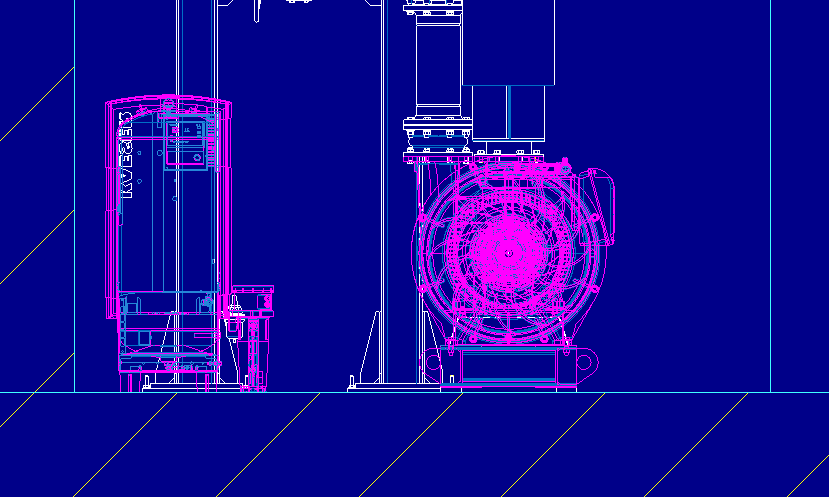
I have two .step files in my assembly model that I am showing on a drawing.  When I do a section view, the linestyles of these parts in the assembly become magnified to show many more line segments.  How can I change this?  See picture below.


This thread is inactive and closed by the PTC Community Management Team. If you would like to provide a reply and re-open this thread, please notify the moderator and reference the thread. You may also use "Start a topic" button to ask a new question. Please be sure to include what version of the PTC product you are using so another community member knowledgeable about your version may be able to assist.
Best answer by StephenW

Your step file is a surface model, not a solid model. You have a couple of options.

1. You can convert the surface model to a solid model which may be difficult.

or

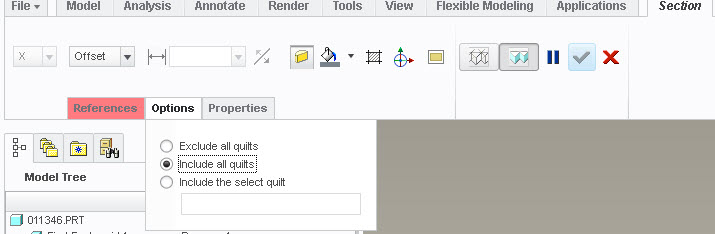
2. You can add quilts to your x-section by selecting "include all quilts" when creating the x-section under the options tab.

quilt-xsection.jpg

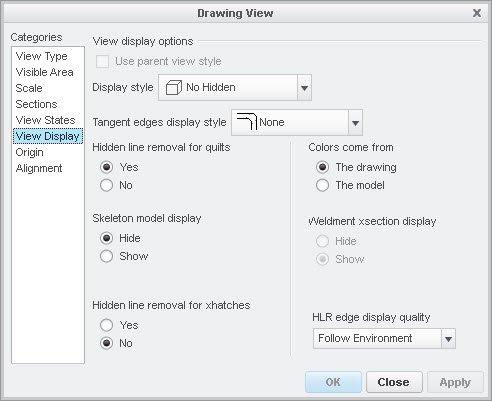
You'll also have to make sure in your view properties on your drawing that HIDDEN LINE REMOVAL FOR QUILTS is set to yes.

hlr-quilts.jpg

2 replies

StephenW
StephenW23-Emerald IIIAnswer
23-Emerald III
September 30, 2015

Your step file is a surface model, not a solid model. You have a couple of options.

1. You can convert the surface model to a solid model which may be difficult.

or

2. You can add quilts to your x-section by selecting "include all quilts" when creating the x-section under the options tab.

quilt-xsection.jpg

You'll also have to make sure in your view properties on your drawing that HIDDEN LINE REMOVAL FOR QUILTS is set to yes.

hlr-quilts.jpg

1-Visitor
September 30, 2015

Thank you Stephen, that did the trick!!