
14-Alexandrite
June 23, 2025
Solved

lot of Windchill Icons in Creo Parametric

  • June 23, 2025
  • 1 reply
  • 620 views

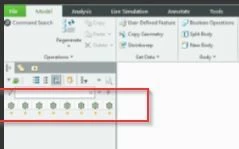
In Creo, I'm getting lot of Windchill Icons just above the  model tree. Please let me know if anyone see this issue. Usually we will get one Windchill icon for one part right. but I'm getting Creo window with lot of Windchill icons as below. Please some one help me on this.
Creo issue-01.jpg


Thank you
Kumar B

Best answer by Kumar_KB

Hi Chris,


I didn't tried that option. But I got an article in PTC support.


https://www.ptc.com/en/support/article/CS361601?source=search 


Thanks

Kumar B

1 reply

Chris3
21-Topaz I
June 23, 2025

I don't know the answer but I wouldn't be surprised if this is caused by a toolkit that's running. Do you have any toolkits?


With this type of question the first thing to test is to use the out of the box version of Creo and then make the connection to Windchill. You can go to <creo load folder>\Creo X.Y.Z.0\Parametric\bin and launch parametric.exe from there (check to make sure no configs are loaded) and then connect to Windchill and see if the result persists. If the issue isn't there then it is a config or toolkit that you are loading. At that point it is just a process of turning on things 50% at a time until if figure out what is causing it.

Kumar_KB14-AlexandriteAuthor
14-Alexandrite
June 23, 2025

Thanks Chris for quick response.

 But we don't have any ToolKit. We just use standard Creo parametric 9.0.9.0. Even I tried with replacing my master config file in Users machine but no use. still we are having above issue.


Thanks

Kumar B

Chris3
21-Topaz I
June 23, 2025

Have you tried opening up parametric.exe with no configs, no UI file?