
15-Moonstone
October 22, 2025
Solved

Make cut through all the default

  • October 22, 2025
  • 2 replies
  • 356 views

As at least until Creo Parametric 11.0.6.0 when making a cut while using extrude or hole (and several other things that cut through geometry) the default is "Blind" and then with some random depth.

It would be far more confienient when this is "Through all" by default. This also solves that much engineers do not take the effort to set the depth to through all so the end of the cutout is somewhere outside the geometry (as shown below)
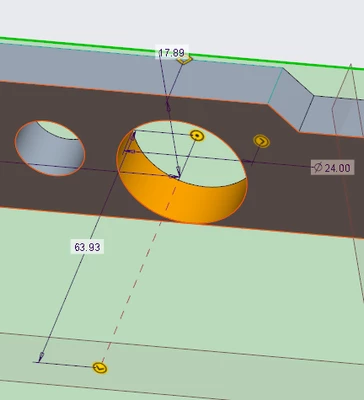
 

RobertH_0-1761145359154.png


So make a config.pro option tho set the default to "Through all" for at least the cases shown below.
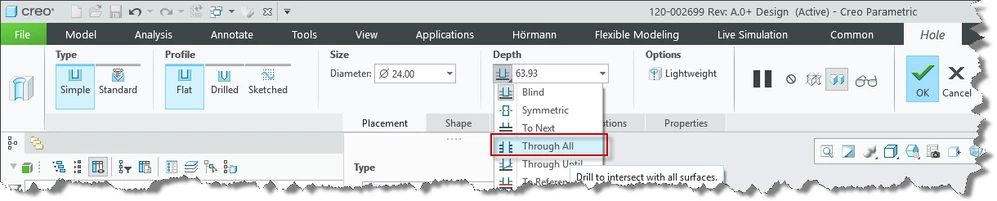
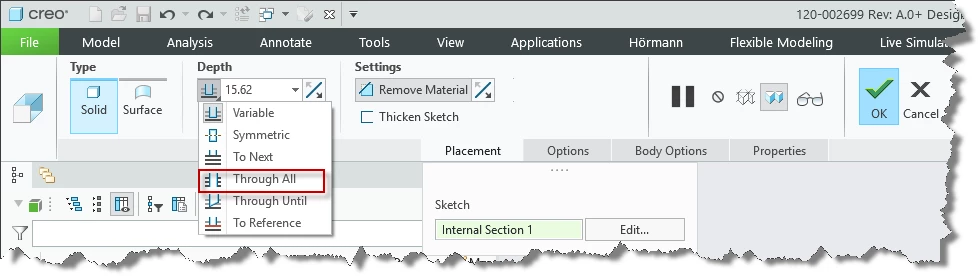
RobertH_2-1761145600870.png

RobertH_0-1761145675842.png


Best answer by tbraxton

Check out feature presets which may address your particular issue if you upgrade to Creo 12.


Feature Presets


As of Creo 12.4, feature presets are supported for:


  • Hole

  • Extrude

  • Revolve

  • Round

  • Chamfer

  • Curve from Equation


2 replies

RobertH15-MoonstoneAuthor
15-Moonstone
October 22, 2025

Sorry, I thought I was in the "Creo Parametric Ideas" section and as I did not found any related I thought it was new. 

But it seems that there is already an Idea posted.

tbraxton
22-Sapphire II
tbraxton22-Sapphire IIAnswer
22-Sapphire II
October 22, 2025

Check out feature presets which may address your particular issue if you upgrade to Creo 12.


Feature Presets


As of Creo 12.4, feature presets are supported for:


  • Hole

  • Extrude

  • Revolve

  • Round

  • Chamfer

  • Curve from Equation


RobertH15-MoonstoneAuthor
15-Moonstone
October 22, 2025

Answers indirect the question but for me the problem is that we recently updated to Creo 11 and therefore do not have this functionality, updating is not that easy in a bigger company.