
1-Visitor
May 5, 2021
Solved

Making a part in an assembly a reference

  • May 5, 2021
  • 2 replies
  • 4168 views

In creo how do you make a part within an assembly a reference part. What I mean by this is I want to put a part in an assembly, but I only want it to be in the model, not the Bill of Materials. So when I export the Bill it doesn't include the part. So it shows up in the model only.
Best answer by Mathpp

Below I will leave you the solution to your problem.


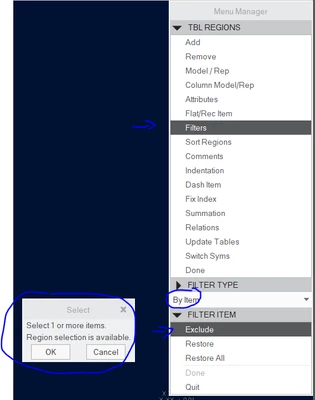
Table -> Repeat Region --> Filters --> Select BOM --> By Item --> Exclud --> Select the item you want not to appear


Mathpp_0-1620221156542.png

And click on Done.

2 replies

1-Visitor
May 5, 2021

Hi,

Let me see if I understand, would you like to add a model in an assembly, however this model should not appear in BOM?

How did you create this BOM list? Is there a parameter in the reference piece that adds the BOM list?

1-Visitor
May 5, 2021

Yes, I would like to add a model in an assembly, and it not appear in the BOM. We have a program that automatically exports the BOM. In inventor we used to be able to make a part a reference part, which would make it a model only part and it only appeared in the model.

Mathpp1-VisitorAnswer
1-Visitor
May 5, 2021

Below I will leave you the solution to your problem.


Table -> Repeat Region --> Filters --> Select BOM --> By Item --> Exclud --> Select the item you want not to appear


Mathpp_0-1620221156542.png

And click on Done.

16-Pearl
May 6, 2021

Not sure how you reference, or for what purpose of that part in the assembly, but you might want to check out the skeleton model. We use skeleton model as design reference part. Hope it helps you as well.