
14-Alexandrite
April 8, 2020
Solved

Making a Triangle Note with a Parameter

  • April 8, 2020
  • 1 reply
  • 2810 views

Community,


The below symbol was made in creo 5, but only the triangle and left-hand leader.  The number was entered as a note.  How can I made a triangle symbol where the system prompts me to enter the number, like the flag note that comes in the pallette?  Thanks in advance.
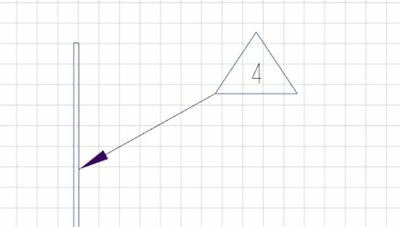


triangle_note.JPG


I was trying to get \note_#\ into the custom symbol.  Does anyone know how to do this?

Best answer by ThoRig

I figured this one out.  When you create the custom symbol from copied geometry, put \note_#\ inside the symbol and copy it along with the geometry.  Then set the attributes.

1 reply

ThoRig14-AlexandriteAuthorAnswer
14-Alexandrite
June 26, 2020

I figured this one out.  When you create the custom symbol from copied geometry, put \note_#\ inside the symbol and copy it along with the geometry.  Then set the attributes.