

Mapkey Help
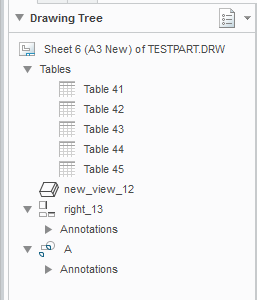
I am trying to put together a series of mapkeys that, along with other actions, delete specified tables from the drawing. I have it working, but the way it selects the table is by ID number (see the green line of the code below), I don't really like doing this and would rather use the table's name from the drawing tree. Say for instance "Table 43" from the picture below, though obviously these would be renamed in practise.
Can anybody tell me the syntax I need to use to achieve this? I tried using the macro recorder to work it out, but that was no help...
The code I'm using now:
mapkey(continued) ~ Command `ProCmdMdlTreeSearch`;\
mapkey(continued) ~ Open `selspecdlg0` `SelOptionRadio`;~ Close `selspecdlg0` `SelOptionRadio`;\
mapkey(continued) ~ Select `selspecdlg0` `SelOptionRadio` 1 `Drawing Table`;\
mapkey(continued) ~ Select `selspecdlg0` `RuleTypes` 1 `ID`;\
mapkey(continued) ~ Update `selspecdlg0` `ExtRulesLayout.ExtBasicIDLayout.InputIDPanel` `2`;\
mapkey(continued) ~ Activate `selspecdlg0` `EvaluateBtn`;~ Activate `selspecdlg0` `ApplyBtn`;\
mapkey(continued) ~ Activate `selspecdlg0` `CancelButton`;\
mapkey(continued) ~ Activate `main_dlg_cur` `page_Annotate_control_btn` 1;\
mapkey(continued) ~ Command `ProCmdEditDeleteDwg`;\
Drawing Tree
Thanks in advance,
Dave
This thread is inactive and closed by the PTC Community Management Team. If you would like to provide a reply and re-open this thread, please notify the moderator and reference the thread. You may also use "Start a topic" button to ask a new question. Please be sure to include what version of the PTC product you are using so another community member knowledgeable about your version may be able to assist.