3-Newcomer
October 12, 2023
Solved

Mapkey To change drawing scale

  • October 12, 2023
  • 1 reply
  • 5343 views

Hi all,


I'm currently trying to create a mapkey for drawings that does a number of things, but I'm having trouble with just one part.

I'm making a mapkey that, when activated, will first ask the user to select a view on the drawing, and when you resume, it will set that model to be used in the tree, and then edit the definition, go to the scale settings and set the scale to default for view (I have to do this particular set of actions for a lot of company drawings as many have been set up to use custom scales which is no longer desirable).

The last part of the mapkey is to go to the bottom left corner of the screen, where it says "SCALE," and open the prompt and allow the user to type a scale in. 

This is the part where it goes wrong- I can't seem to get it to open the prompt right away so that all I have to do is just type a scale in, hit the green check, and then the mapkey is finished. I've tried different prompting options but none of them give the optimal effect, as I'd like to make this a company wide mapkey. The screenshot attached is what I'd essentially like the last part of the mapkey to bring up.


Any assistance would be greatly appreciated. Running on Creo 8.0.8.0.



Best answer by tbraxton

This is one way to generate the mapkey you need.


As a test case for your issue, do the following:


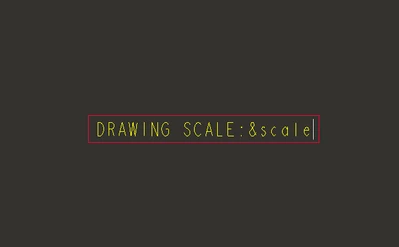
Add a note to the drawing displaying the dwg scale parameter using the exact syntax shown below (&scale).

tbraxton_0-1697212776363.png


Test this mapkey which will prompt the user to enter a value for the drawing scale.

mapkey $F7 @MAPKEY_LABELEDIT DWG SCALE;\
mapkey(continued) ~ Timer `UI Desktop` `UI Desktop` `popupMenuRMBTimerCB`;\
mapkey(continued) ~ Close `rmb_popup` `PopupMenu`;\
mapkey(continued) ~ Trail `MiniToolbar` `MiniToolbar` `UIT_TRANSLUCENT` `NEED_TO_CLOSE`;\
mapkey(continued) ~ Command `ProCmdDwgEditValue@PopupMenuGraphicWinStack`;


This video shows it working in Creo 7.09.

1 reply

tbraxton
22-Sapphire II
22-Sapphire II
October 13, 2023

Try preselecting the scale parameter before running the mapkey to change the value.


There is a drawing system parameter that sets the drawing scale. This may be a better way to set it rather than mouse picks in the graphics area and UI.


I would suggest creating a mapkey that sets the scale parameter vis user input and nesting this within the mapkey sequence you are attempting to create.


See this link for drawing parameters: System Parameters for Drawings (ptc.com)

3-Newcomer
October 13, 2023

How would I go about setting the parameter manually in a map key as opposed to a mouse click?

tbraxton
22-Sapphire II
22-Sapphire II
October 13, 2023