1-Visitor
July 6, 2020
Solved

Mass Summation in Repeat Region

  • July 6, 2020
  • 1 reply
  • 6158 views

I am attempting to create a repeat region that sums the mass of different material types in an assembly.  The issue is I have different common names using the same material in the table.  I know I can do this through filter, but I am being asked to provide a different solution.  Oh yeah - I don't know how to write relations!


Appreciate any guidance,

Helena

Best answer by MartinHanak

@hbharrison wrote:

I would like all the PP (or like materials) to consolidate in the same row along with the mass.  So, as you saw in the one table where PP material is a quantity of 5, there would be another column for mass and all 5 of the masses would be summed on the same line.


Thanks for your thoughts


As is in Excel:
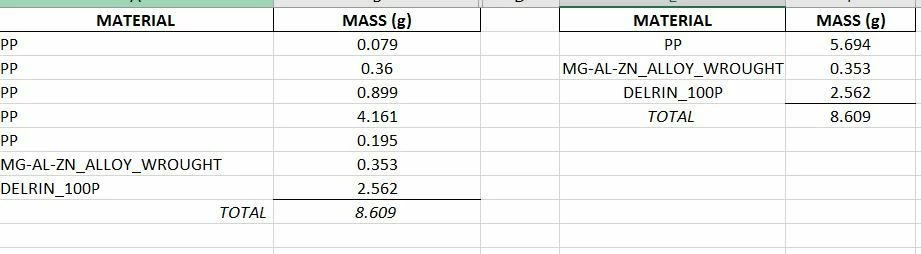
Creo3.JPG


Hi,

I think that your request cannot be easily met in Creo.

1.]

YES, you can create the table in the picture on the left using repeat region + summation. Unfortunatelly you cannot "collapse" rows with the same material into one row with mass summed up (in this table).

... perhaps if you moved all the parts to 1 subassembly, then you would reach the goal ...

2.]

To get mass of all parts with the same material, you have to create separate repeat region for every single material and apply filter to display part with specific material, only. Then you can add summation cell.

3.]

If you accept non-parametric solution, then:

  • create the table in the picture on the left using repeat region + summation
  • export the table into CSV file
  • import CSV file into Excel
  • use Excel functionality to get the table in the picture on the right
  • export new table from Excel to CSV file
  • import CSV file into Creo drawing


1 reply

1-Visitor
July 7, 2020

Hi Helena

here is part of the solution- but you will need to have just ONE parameter for the mass off the parts.

     {set configuration setting "mass_property_calculate"= automatic, and regenerate your assembly, make sure    every part has its material set. If you want,  in an assembly window in the model tree you can show columns for   material and mass:

     modelparams->ptc_material_name

     Mass properties params->pro_mp_mass                                               }

Now back to your drawing repeat region.

 Include in your table  these columns "rpt.qty" "asm.mbr.pro_mp_mass" "rpt.rel.qtymass"  and {optional "asm.mbr.ptc_material.PTC_MATERIAL_NAME"  }

         (add some blank columns, set switch symbols to see the symbols, double click in second row cells and  build up the names of the columns, switch symbols to see the result)

Add a relation              QTYMASS=rpt_qty*asm_mbr_pro_mp_mass

         (Repeat Region->relations->select table-> type the relation (can also right click on the parameters in the list and add to the relation.)

Update table and regen and you should have a column of masses.

Add sum:            Add a row to the table to place sums in, Then:
               Table-> switch symbols (to show symbols)
               TABLE –> REPEAT REGION->SUMMATION select the region
               (TBL Sum) ADD -> ByText –select the parameter to sum(in row 2), "rpt.rel.qtymass" ->enter a name for it "sumqtymass" ->pick a cell to put it in (note it does not necessarily have to be the cell below the column being summed, but that is where I would put it)

I hope this helps.


you may also need to set the repeat region attributes  "No Duplicates" & "Flat"


1-Visitor
July 7, 2020

Thanks!  I'll give it a try.
