
12-Amethyst
August 21, 2024
Solved

Material Definition Creo View

  • August 21, 2024
  • 1 reply
  • 1862 views

Is there a way to see the material definition for a step file in Creo View?

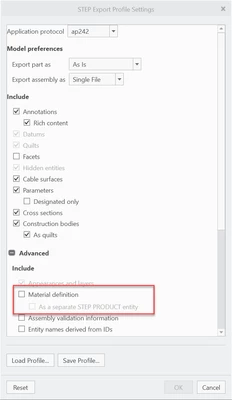
In Creo 10, I am able to select the option for "Material Definition" when I create the step file. However, after exporting the step file and opening it in Creo View, I don't see any way to view the materials I had original defined in Creo 10
JR_10680659_0-1724258356288.png


Best answer by JR_10680659

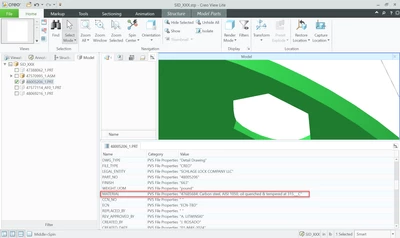
Think I actually found it. If you select the "As a Separate STEP PRODUCT Entity" option, then I'm not sure what it does with the data. However, if you leave it unchecked, then it just appears as a parameter when you select the part.

JR_10680659_0-1724262455379.png


1 reply

17-Peridot
August 21, 2024

This option is also available in Creo 7.  The material does not get saved in the STP file. Maybe that is part of there Phase II to STP implementation that is coming down the road in Creo 11.


llie_0-1724261115374.png


21-Topaz II
August 21, 2024

According to this:

https://support.ptc.com/help/creo/creo_pma/usascii/index.html#page/data_exchange/interface/Supported_STEP_AP203_and_AP214_Classes.html 

some (newer?) STEP formats will include material metadata. How that is interpreted by the next program you import the STEP file into is another matter. It appears to not be handled in a desirable fashion, or at least does not provide a means of inquiring. I don't use Creo View, so don't know - does it let you do a File->Prepare->Model Properties like regular Creo does?

JR_1068065912-AmethystAuthorAnswer
12-Amethyst
August 21, 2024

Think I actually found it. If you select the "As a Separate STEP PRODUCT Entity" option, then I'm not sure what it does with the data. However, if you leave it unchecked, then it just appears as a parameter when you select the part.

JR_10680659_0-1724262455379.png