

1-Visitor
November 1, 2019
Solved

MBD Datum tag line through datum

  • November 1, 2019
  • 2 replies
  • 1453 views

I've got a problem with datum tags in drawings. (Creo 4.0 M070)

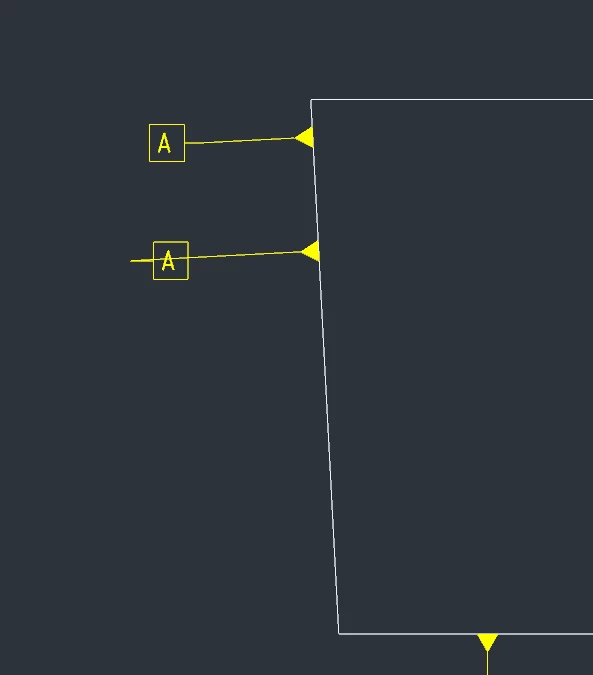
When created in model as the new workflow suggests the datum tag line goes through the datum tag on the drawing.

If I create the datum tag within the drawing the datum tag looks good. I don't want to do it this way, I want to define it in the model but I can't stand how it looks. 

It only applies to surfaces that's not horizontal or vertical.

See example below. (The upper datum tag is created within the drawing and the lower is created in the model)
datum.PNG


Best regards

Alex

Best answer by KenFarley

I just did a quick check (Creo 4.0, M090) and I don't see this kind of behavior, oddly, but it doesn't matter. What you need to do is:

* Select the offending datum tag

* Hover over it until you see the four directional arrow cursor

* Simultaneously hold the left mouse button and the shift key

* Slide the box (with the letter in it) to the right or left, switching (if you wish) the side that the straight leader comes from

It's basically the same functionality that you have with diameter/radius dimensions and the like.

2 replies

KenFarley
KenFarley21-Topaz IIAnswer
21-Topaz II
November 1, 2019

I just did a quick check (Creo 4.0, M090) and I don't see this kind of behavior, oddly, but it doesn't matter. What you need to do is:

* Select the offending datum tag

* Hover over it until you see the four directional arrow cursor

* Simultaneously hold the left mouse button and the shift key

* Slide the box (with the letter in it) to the right or left, switching (if you wish) the side that the straight leader comes from

It's basically the same functionality that you have with diameter/radius dimensions and the like.

ahedstrom1-VisitorAuthor
1-Visitor
November 1, 2019

Thanks! The shift + LMB did the trick!
