
10-Marble
November 1, 2022
Solved

Merge mirrored sheetmetal pieces

  • November 1, 2022
  • 1 reply
  • 1857 views

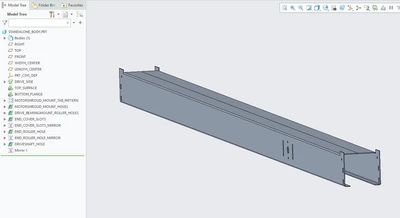
I have modeled half of a sheetmetal part. I then selected the part in the model tree and mirrored it. In the options for the mirror I have selected "Merge to model". How do I join these two parts along the seam created by the mirror, on the top surface? I would have thought that "Merge walls" was the tool I needed, but I can't get that to work with any combination of selected surfaces.
GL_9723777_0-1667324563566.png


Best answer by Gavin_Lewis

Figured it out. The plane I was using to mirror was offset incorrectly. This resulted in slight gap between the original and mirrored halves, which prevented them from merging together during the mirror.

1 reply

tbraxton
22-Sapphire II
22-Sapphire II
November 1, 2022

When you mirror the part is the mirror creating a new body? If not and there is only 1 body in the model, then more info would be needed to figure it out.

10-Marble
November 1, 2022

No, a new body is not created. The mirror just shows up as a feature in the model tree.

GL_9723777_0-1667325382228.png


Gavin_Lewis10-MarbleAuthorAnswer
10-Marble
November 1, 2022

Figured it out. The plane I was using to mirror was offset incorrectly. This resulted in slight gap between the original and mirrored halves, which prevented them from merging together during the mirror.