1-Visitor
January 7, 2015
Solved

Method for finding dimensions in drawing

  • January 7, 2015
  • 1 reply
  • 6703 views

In the drawing view is it possible to find the location of a dimension of a feature, by clicking on that particular feature in the model tree.

Best answer by ClintWalton

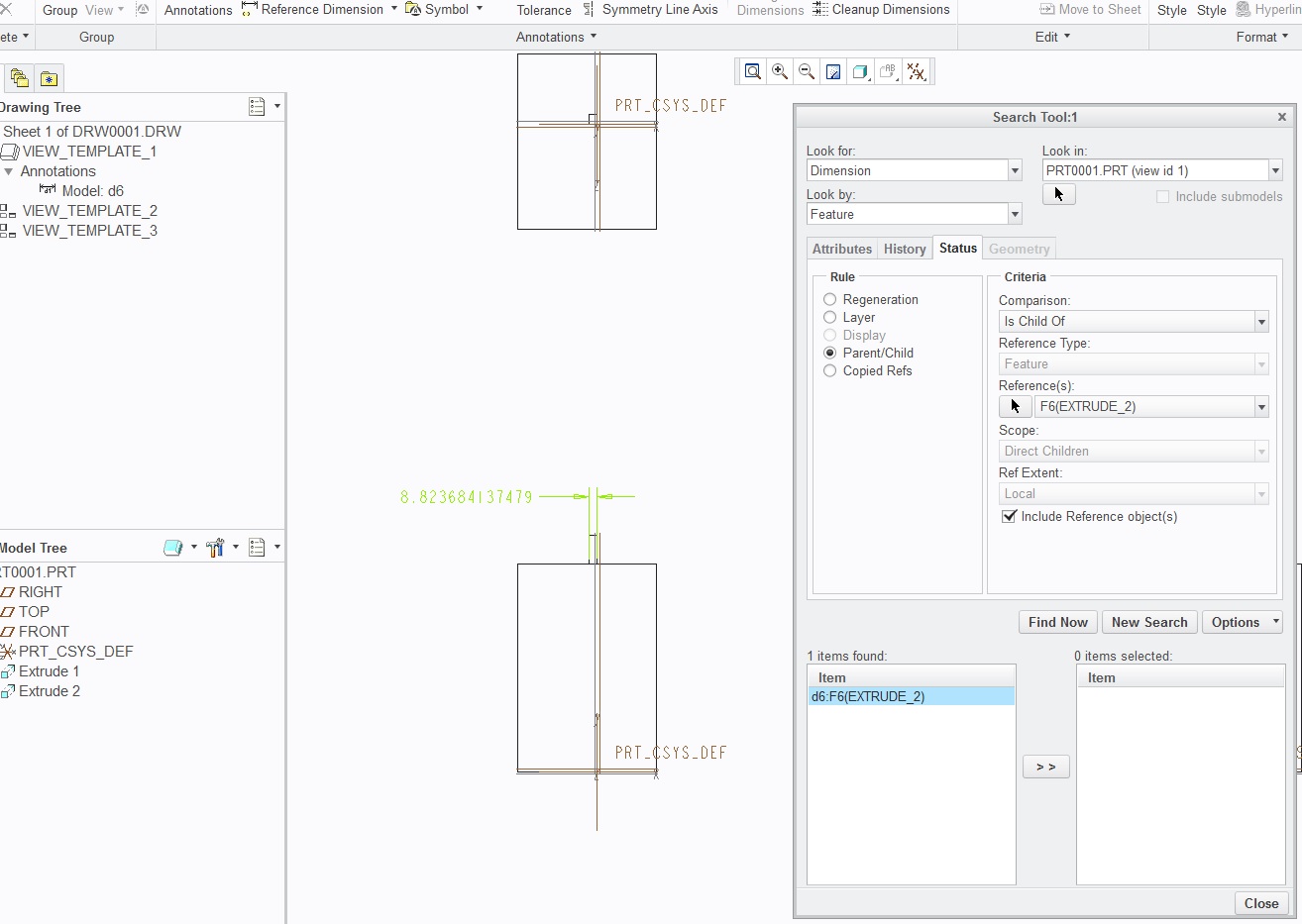
If the feature dimension has already been shown in the view, the search seems to do the trick with the following search criteria.

.Search_Dim.jpg

If the dimension has not yet been shown and you're trying to show it by looking only at its feature, click "Show Model Annotations" then click the feature from the Model Tree.

1 reply

1-Visitor
January 9, 2015

If the feature dimension has already been shown in the view, the search seems to do the trick with the following search criteria.

.Search_Dim.jpg

If the dimension has not yet been shown and you're trying to show it by looking only at its feature, click "Show Model Annotations" then click the feature from the Model Tree.

1-Visitor
January 13, 2015

Thank you Walton, It solved my issue..