12-Amethyst
September 18, 2020
Solved

Min and Max screw-in depths for IFX

  • September 18, 2020
  • 5 replies
  • 3472 views

Hello - I updated my ifx_screw_data.cfg file for the "MIN and MAX Screw-in depth for screws".  In my example, I set the max depth for a 1/4 diameter screw to be .626 inches.  But, when I select a screw that creates a .625 inch depth, it is still showing red in the preview.  I thought that changing theses values in the ifx_screw_data.cfg file would cause the preview to show green between the new min and max range that I set.  I closed out of Creo and re-started but my changes still don't seem to have taken affect.  What am I missing?


Thanks
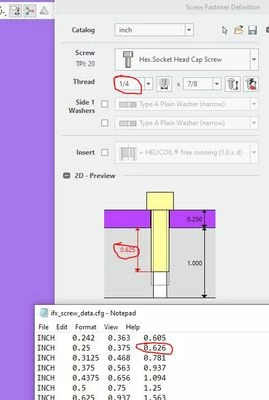
 

IFX_min_max_depth.JPG

Best answer by OliverGräbner

@MartinHanak we already solved this.


@Blackhawk can you please mark this post as solved.


The reason was, that there was no write access to the installation folder.

In this case IFX copy the configuration files to 'C:\Users\<user>\Documents\buw\IFX\<version>'

The changes in the installation folder where not recognized by IFX because the  documents folder has higher priority.


After changing the 'ifx_screw_data.cfg' in the documents folder it works well.


Regards,
Oli

5 replies

17-Peridot
September 21, 2020

Hi,


there are two sections in 'ifx_screw_data.cfg'

  • #ETSCR - used for screw-in connections with thread
  • #MUSCR - used for connections with nut

Please make sure to make your changes in the correct section.


I have tested this here on my end with #ETSCR - MAX = 0.5 and it works proper.


GREEN for 0.499

OliverGräbner_0-1600671506031.png

RED for 0.500

OliverGräbner_1-1600671542612.png


Maybe you make your changes in the wrong file.

If you do not have access to your installation folder, IFX makes a copy of your configuration files to:

C:\Users\<user>\Documents\buw\IFX\<version>

Or if the environment variable 'IFX_USER_CONFIG_PATH' is set, the configuration might be on another location.


Please verify this at your and and give me feedback if there are still problems.


Kind Regards,
Oli


Blackhawk12-AmethystAuthor
12-Amethyst
September 21, 2020

Hello Oli,


I double checked and I did change the #ETSCR parameter.  I also do not have IFX_USER_CONFIG_PATH set on my computer.  I tried assembling the same bolt again today and I still have the problem.  Below is my ifx_screw_data.cfg file:


Blackhawk_0-1600693449898.png

Thanks,

Brad

17-Peridot
September 21, 2020

Hi,

can you send me your ifx_screw_data.cfg then I will check it.


Regards,
OIi