
12-Amethyst
September 24, 2020
Solved

mini-toolbar disappeared in Creo5

  • September 24, 2020
  • 1 reply
  • 4426 views

I was adding a few icons to the mini-toolbar and saved creo_parametric_customization.ui

Now the mini-toolbar does not show up anymore when I left-click anything. The little window only shows up when I right-click (a long time). using a backup of "creo_parametric_customization.ui" does not help.

Is there a way to get the mini-toolbar back?

Im using Creo 5.0.2.0
 
Best answer by Tdaugherty

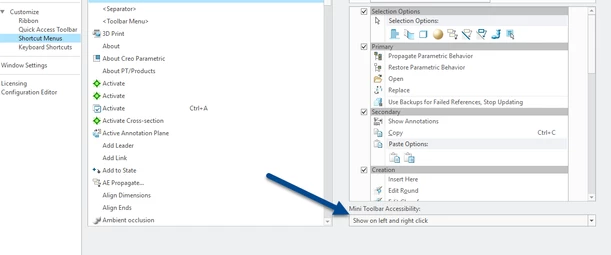
Can you check on this setting? You may have to set it to the proper value and export a new customization.ui.


Tdaugherty_0-1600953442149.png


You could also reset your customizations if that doesn't work.

1 reply

16-Pearl
September 24, 2020

Can you check on this setting? You may have to set it to the proper value and export a new customization.ui.


Tdaugherty_0-1600953442149.png


You could also reset your customizations if that doesn't work.

BJP12-AmethystAuthor
12-Amethyst
September 25, 2020

Thats it, thank you!