1-Visitor
August 14, 2024
Solved

Missing lines on 2d drawing

  • August 14, 2024
  • 3 replies
  • 1467 views

Hi


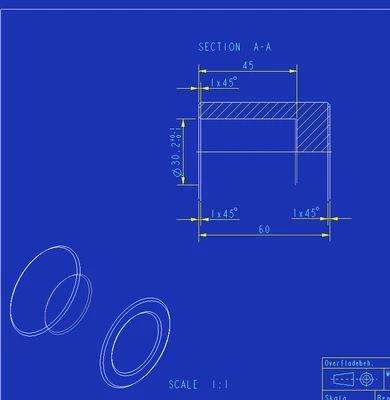
I'm missing lines on my 2d drawing. Is it possible to "update" all views


OR_11661698_1-1723638144975.png


Best answer by KenFarley

Seems like you've somehow turned off silhouette edges.

File->Options->Appearance->Entity Display->Show silhouette edges


Or at least that's the only way I found to duplicate what you show in the isometric view.


Unfortunately, changing this doesn't seem to affect existing views, meaning I had to redefine the view to get it to "update".

3 replies

23-Emerald III
August 14, 2024

in your cofing settings, turn on the option;

display_silhouette_edges YES

KenFarley
KenFarley21-Topaz IIAnswer
21-Topaz II
August 14, 2024

Seems like you've somehow turned off silhouette edges.

File->Options->Appearance->Entity Display->Show silhouette edges


Or at least that's the only way I found to duplicate what you show in the isometric view.


Unfortunately, changing this doesn't seem to affect existing views, meaning I had to redefine the view to get it to "update".

OR_221-VisitorAuthor
1-Visitor
August 15, 2024

Hi

I found a solution to my problem.

This problem occurred after updating to Creo 10 from Creo 8. It seems we have some older drawings with an unusual setup.

What I did

  1. Chose the view with the missing lines.
  2. Properties
  3. Under View display “display style” was set to Default. I changed this to “No Hidden” and all was ok.
  4. Save