Missing section lines in drawing
Using Creo 7.0.5.0
The A-A section (full) that is defined in the model (single body part) appears weird in the drawing. See this image:
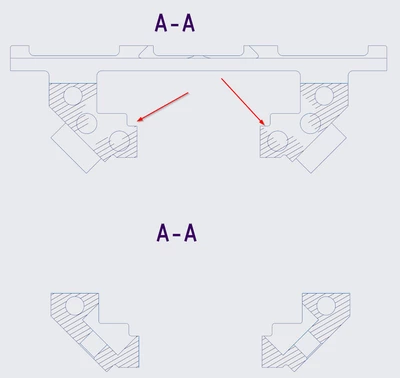
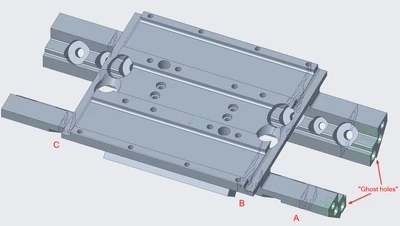
This is the same section, viewed from different directions (by just using Flip), yet the top one is missing the contours of the two holes and the chamfer. (note: I have not used the Counter Bore function, as the holes are normal to the outer 45° angles, and the larger diameter is on the inside). There are also two "ghost holes" seen on each side that shouldn't be visible in the this section (those holes aren't deep enough to reach the section).
I have tried to regenerate, repaint, redefine, use other reference planes and create completely new sections, but no luck.
Noteworthy is that I have similar B and C sections that work perfectly. I have tried to find any differences in how these features and sections are created, but I found nothing.
Here's a view of the part and the section looks as expected. I've also highlighted the "ghost holes".