8-Gravel
Oct 22, 2024 2:06 PM UTC
Solved

Move Section in Modeltree - Creo 10

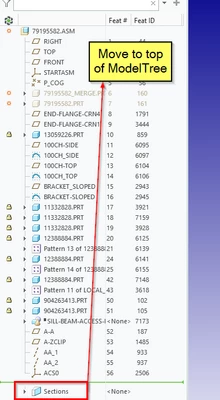
In Creo 10 Is it possible to move the location of the Section to the Top of the ModelTree or even attached this to the Insert Here line.  Is there a setting controlling this location. 
aconnor_0-1729605830380.png


tbraxton
tbraxtonAnswer
22-Sapphire II
Oct 28, 2024 10:48 AM UTC

No, the sections are always placed after the features in the model tree.

Sections—Dedicated container for section features, located at the end of the feature list.

AFAIK there is no option to modify this in the tree.

7 replies

Catalina
Community Moderator
Oct 25, 2024 6:51 AM UTC

Hi @aconnor,

Thank you for your question!

It appears that your post has not yet received any response. I am replying to raise awareness. Hopefully, another community member will be able to help.

 Also, feel free to add any additional information you think might be relevant.


Best regards,

Translate
Catalina | PTC Community Moderator
16-Pearl
Oct 25, 2024 10:20 AM UTC

You are in the wrong forum.


PTC has two CAD systems:    Creo+ and Creo Parametric    and     Creo Elements Direct.


Which makes it confusing.


More, for Creo Elements Direct:

- The 3D software name is Modeling, and

- The 2D software name is Drafting.


For Creo+ and Creo Parametric, use only this tab:

KotomEng_0-1729851618350.png


You should move your post to this community to have a better chance to get an answer.


Translate
aconnor8-GravelAuthor
8-Gravel
Oct 25, 2024 12:43 PM UTC

Thank you, I wasn't sure. Could you tell me how to move the post. 


Translate
16-Pearl
Oct 25, 2024 12:53 PM UTC

I am not sure, but I think that you must delete and rewrite your post in the new forum.


Translate
tbraxton
tbraxton22-Sapphire IIAnswer
22-Sapphire II
Oct 28, 2024 10:48 AM UTC

No, the sections are always placed after the features in the model tree.

Sections—Dedicated container for section features, located at the end of the feature list.

AFAIK there is no option to modify this in the tree.

Translate