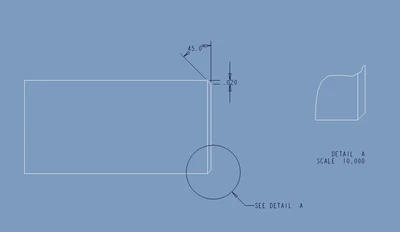
Moving Chamfer Dimensions Attachment
I've suffered long enough and finally decided to ask. Is there a way to move the attachment for a chamfer dimension? We use Angle X D to have separate dimensions for the angle and width but can't always get the dimensions to show up in the views we want them. For example, if you have a chamfer on the edge of a cylinder, the dimensions will show up on the bottom side of one view, but we want it to be on the top of that view. Using Edit Attachment doesn't do anything (it just stays active as if I didn't pick a new attachment point). It's particularly annoying when we have a Detail view of a feature attached to the top side of the view but the chamfer dimensions show up on the bottom side of the view, well outside of the Detail view. Even using Move to View it just says "Can not move the specified dimensions to the selected view." Alternatively, say I want to show the chamfer dimensions in a top view but they're currently in the front view it doesn't always let me move it.
In the attached image I can't get the .020 dimension to move to the bottom of the view or to the Detail view. I placed a top view and I was able to move it there, but it doesn't work in every case.
Rounds seem to have much more latitude in relocating the dimension, but chamfers just refuse to move. What am I missing? I've been putting up with this for many years but I've finally had enough. The fall back is to create an annotated dimension and link it to the parametric dimension, but I really shouldn't have to do that.
Thanks.