
1-Visitor
February 24, 2023
Solved

Negative version level for product

  • February 24, 2023
  • 2 replies
  • 5069 views

Recently I notice a negative version level for product in common space. Not sure how this happened, does any body has a clue why this happened. I am using  Creo Parametric  Version 8.0.4.0


Thank you


Best answer by TomU

While it may look like a negative number, it's actually not.  A version is comprised of the revision, a dot, and the iteration.  The revision series is configurable, but typically something like A, B, C, D, E,... or 1, 2, 3, 4, 5, ... is used.  It's pretty common to have the first revision in either series start with the dash ( - ).
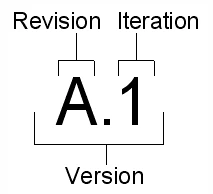
 

TomU_0-1677331253353.png


See these help pages:

2 replies

TomU23-Emerald IVAnswer
23-Emerald IV
February 25, 2023

While it may look like a negative number, it's actually not.  A version is comprised of the revision, a dot, and the iteration.  The revision series is configurable, but typically something like A, B, C, D, E,... or 1, 2, 3, 4, 5, ... is used.  It's pretty common to have the first revision in either series start with the dash ( - ).


TomU_0-1677331253353.png


See these help pages:

1-Visitor
February 27, 2023

Thank you.

17-Peridot
February 26, 2023

You can set each Windchill Product to start with either a "-" or a number for the revision scheme. You image is showing the version which is comprised of revision.iteration.

Version=revision.iteration

-.2

A.5

LL.21

1-Visitor
February 27, 2023

Thank llie, my issue is that I changed the version level to 1 and checked the model to common space. The next day the model level is changed to -.1 and -.2

I like to know or found the root cause.

Thank you.


23-Emerald III
February 27, 2023

Look at the history of the part in the commonspace to see what the History of the check-in and revision history is

StephenW_0-1677515131337.png