1-Visitor
January 11, 2021
Solved

New datum plane being hidden

  • January 11, 2021
  • 1 reply
  • 1317 views

 Hello,

So I noticed that when I create an offset datum plane its being hidden automatically. So I tried to put it in layer, which is visible, planes are visible but no results. Also I searched for some kind of option, but I could not find it. Is it possible to change, so it can be visible? I am using Creo 6.

Best answer by kdirth

A couple of things to look at:


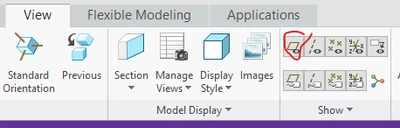
Is the datum display for planes turned off?

kdirth_0-1610371080721.png


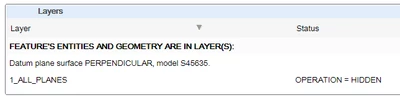
Are all of the layers that the datum plane is on shown?  

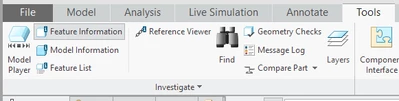
Use Feature Information to determine which layers the datum plane is on.

kdirth_1-1610371335915.pngkdirth_2-1610371364386.png


1 reply

kdirth
21-Topaz I
kdirth21-Topaz IAnswer
21-Topaz I
January 11, 2021

A couple of things to look at:


Is the datum display for planes turned off?

kdirth_0-1610371080721.png


Are all of the layers that the datum plane is on shown?  

Use Feature Information to determine which layers the datum plane is on.

kdirth_1-1610371335915.pngkdirth_2-1610371364386.png


There is always more to learn.
1-Visitor
January 11, 2021

Thank you. This function Feature Info. helped me a lot. 🙂