
1-Visitor
September 29, 2016
Question

New tree column for rpt.index

  • September 29, 2016
  • 6 replies
  • 2806 views

Hi,


would it be somehow possible to add a new column into my model tree for Symbol Parameter rpt.index which would show the number of the position? The main reason is to have an overview which position is related to a particular model.
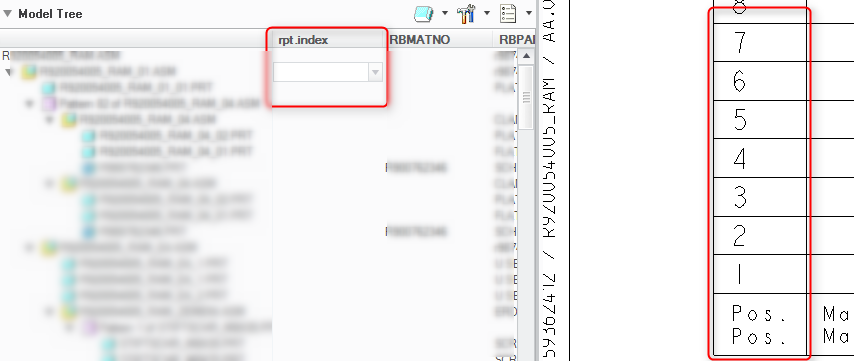
Your help is appreciate.

Thanks.


T.


This thread is inactive and closed by the PTC Community Management Team. If you would like to provide a reply and re-open this thread, please notify the moderator and reference the thread. You may also use "Start a topic" button to ask a new question. Please be sure to include what version of the PTC product you are using so another community member knowledgeable about your version may be able to assist.

6 replies

24-Ruby III
September 29, 2016

Hi,

rpt.index can be used on repeat region, only !

INFO: You can define model parameter or component parameter and display it in repeat region.

MH

tvasina-21-VisitorAuthor
1-Visitor
September 30, 2016

In case that you have hundred components in BOM table then it is too much work to define another parameter. My intention is to easily find and open a model which has the position number.

E.G. There is a component in BOM table with repeat region. I find out that the component has a wrong parameter. The parameter is defined by relations. So I have to find the component, open it and change the parameter or relation. It is not possible to open a component directly from the BOM table and there is no indication of position number in model tree as well. Only one option is to add BOM balloons in a 3D view, click on a cell of desired position number in BOM table, it highlights the balloon in the view, then you can identify the model from the view, use the function Set/Add Drawing Model and open it.

Do you have any idea how to do that easy and fast?

24-Ruby III
September 30, 2016

Hi,

in CR2 I found following procedure:

1.] open drawing with repeat region, repeat region contains column with &asm.mbr.name

2.] select table cell with component name, press right mouse button and execute Copy command

3.] click empty location to deselect table cell, press right mouse button and execute Paste command

4.] now you have a copy of component name in new note

5.] select the note, press right mouse button and execute Properties command

6.] copy component name from Note Properties dialog box

7.] File > Open > paste component name and add file extension (for example .prt), press ENTER

8.] component is displayed in new window

I know the above procedure is little bit complicated

MH

tvasina-21-VisitorAuthor
1-Visitor
September 30, 2016

Thanks for your point

It is still not easy enough to make me satisfied. Looks like there's only one way.

In Drawing environment Use Tools -> Relations -> Look In (Assembly or Part) -> Select Object from a view where a created BOM balloon highlighted is

If anybody has another idea please submit it

12-Amethyst
September 30, 2016

Confirming we can't do this as stated, though if you have parameters to mirror the index, you could do it that way.  There is potential for enhancement here, you could possibly include auxiliary concepts like

rpt.index (or other repeat region value) in specified region

pos_loc grid location in a specified view

pos_loc grid location of a BOM balloon for this component

other possibilities?

If there is interest in one or another of these, a product idea would be a good next step.