1-Visitor
July 4, 2022
Solved

no tolerance in drw file in creo 7.0.6

  • July 4, 2022
  • 1 reply
  • 1503 views

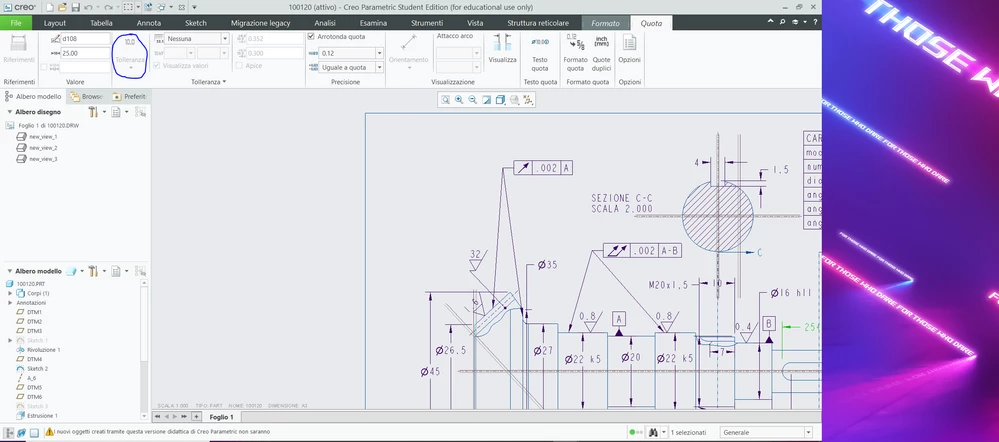
the tolerance feature in unactive. as you can see i can't choose the type of tolerance in the feature in the blue circle. This doesn t allow me to change the tolerance. In the part i can, but in the draw i ve this problem. i tried to change tol_display in "yes" in the editor configuration but nothing changed. please help me.Creo.PNG
Best answer by MartinHanak

@GG_9658844 wrote:

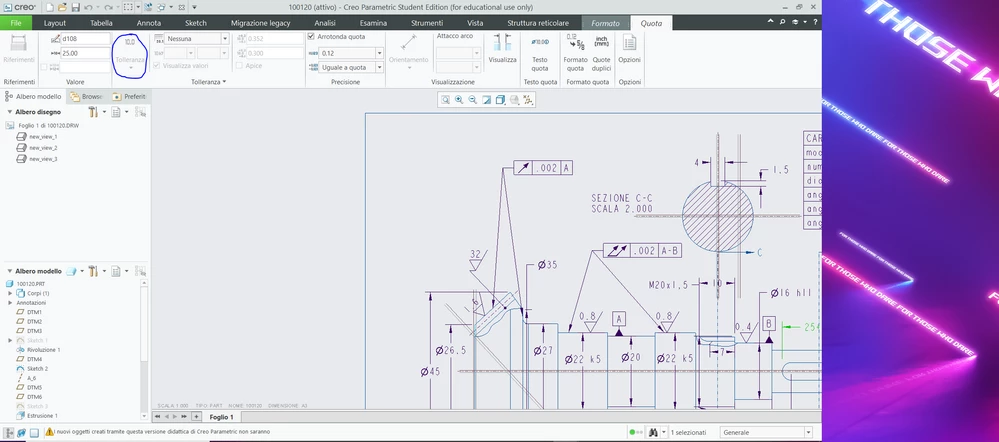
the tolerance feature in unactive. as you can see i can't choose the type of tolerance in the feature in the blue circle. This doesn t allow me to change the tolerance. In the part i can, but in the draw i ve this problem. i tried to change tol_display in "yes" in the editor configuration but nothing changed. please help me.Creo.PNG


Hi,

you have to turn on display of tolerances in drawing, too. See uploaded video drawing_tols.mp4.

You can save Drawing options into the file with .dtl extension and reference it in config.pro option using drawing_setup_file option.

Creo copies .dtl file into every new drawing. In existing drawings you have to load specific .dtl file manually.

1 reply

24-Ruby III
July 4, 2022

@GG_9658844 wrote:

the tolerance feature in unactive. as you can see i can't choose the type of tolerance in the feature in the blue circle. This doesn t allow me to change the tolerance. In the part i can, but in the draw i ve this problem. i tried to change tol_display in "yes" in the editor configuration but nothing changed. please help me.Creo.PNG


Hi,

you have to turn on display of tolerances in drawing, too. See uploaded video drawing_tols.mp4.

You can save Drawing options into the file with .dtl extension and reference it in config.pro option using drawing_setup_file option.

Creo copies .dtl file into every new drawing. In existing drawings you have to load specific .dtl file manually.