16-Pearl
January 27, 2022
Solved

Notebook/Layout Parameters

  • January 27, 2022
  • 4 replies
  • 4336 views

Notebook/Layout Users (Creo 6):

I thought to create a Notebook file to have universal parameters.

I created a notebook/layout called aaa with a parameter called xxx.
I created a part yyy and declared it to the notebook/layout aaa.
Now it is locked in the part yyy as the parameter xxx.
I create a drawing zzz with xxx as the model.
In a note I create &xxx.
One would think the result would report what xxx was equal to?
No, it simply does not work.
What am I doing wrong?

WayneF

🤔

Best answer by tbraxton

This is a documented issue with parameters created in a Notebook. It should have been fixed 20+ years ago. Log a call with PTC and ask for it to be corrected.


A workaround is to create a relation using the notebook parameter to define a new parameter for use in the drawing.


As an example, assume the following in addition to your stated conditions:

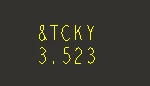
Notebook parameter (real #) is defined as: TCKY=3.522872


Create a relation in the part referenced by the drawing:

/*test param value
test=TCKY

Create a note in the drawing using the parameter values:

&TCKY
&TEST


The note will appear as shown here:

tbraxton_0-1643290432159.png


4 replies

23-Emerald IV
January 27, 2022

"I create a drawing zzz with xxx as the model." 

I'm assuming you mean "yyy as the model".


I just tried the same thing and I'm getting the same results.  Model parameters created from a layout will not display in a drawing of that same model.  Odd.  I wonder why...

wfalco16-PearlAuthor
16-Pearl
January 27, 2022

Thanks for the attempt Tom!

23-Emerald IV
January 27, 2022

I just tested this in Creo Parametric 7.0 and Wildfire 5.0 and the behavior is identical.  The drawing will not display any model parameter values derived from the layout/notebook.  

wfalco16-PearlAuthor
16-Pearl
January 27, 2022

See tbraxton's fix. Works.

tbraxton
tbraxton22-Sapphire IIAnswer
22-Sapphire II
January 27, 2022

This is a documented issue with parameters created in a Notebook. It should have been fixed 20+ years ago. Log a call with PTC and ask for it to be corrected.


A workaround is to create a relation using the notebook parameter to define a new parameter for use in the drawing.


As an example, assume the following in addition to your stated conditions:

Notebook parameter (real #) is defined as: TCKY=3.522872


Create a relation in the part referenced by the drawing:

/*test param value
test=TCKY

Create a note in the drawing using the parameter values:

&TCKY
&TEST


The note will appear as shown here:

tbraxton_0-1643290432159.png


wfalco16-PearlAuthor
16-Pearl
January 27, 2022

Thanks t,


I will look at this.


Wayne

23-Emerald IV
January 27, 2022

"No plans to fix."  ☹️

https://www.ptc.com/en/support/article/cs178103


tbraxton
22-Sapphire II
January 27, 2022

I would encourage all users that use or may use notebooks to open a call with PTC support requesting that this SPR (SPR 2227876) be addressed. Layout/Notebooks have been neglected with no new development in a long time.


PTC is presenting Mathcad as the tool to use for engineering notebooks to drive Creo models and not developing the existing tool within Creo that was created to support this workflow.

23-Emerald IV
January 27, 2022

We gave up trying to use notebooks when we first started using Intralink, and now Windchill.  The two don't play nice together.  All of our parts and assemblies contain a bunch of designated parameters that are linked to Windchill attributes.  As soon as you declare a layout to a model, all of the layout's parameter values override the model's parameter values.  This means something like 'DESCRIPTION' for every downstream model will now show the value in the layout.  Until PTC provides some way to choose which layout parameters propagate and which ones don't, they really are not a solution for those integrated with Windchill.