14-Alexandrite
July 15, 2020
Solved

Notes With Floating Symbols

  • July 15, 2020
  • 1 reply
  • 1956 views

Community,


I have created some notes on a drawing, and I am trying to figure out how to make symbols float with the notes.  Unlike the previous post where I asked how to make a leader note with a balloon note, this is a little different.  For example, I can make a flag symbol with a note number inside the flag, but if I move the note, the flag symbol will not move with it.  Unlike making a balloon note where I can choose offset, I could not find this feature with symbols, even under the attributes for symbols.  Is there a way to do this?  Thanks in advance.

Best answer by StephenW

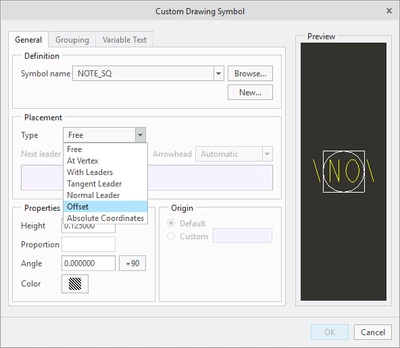
You have 2 options, if you symbol has the "offset" option, you will pick the note you want it to attach to and then place the symbol

-OR-

if you don't have the offset option, you can use the RELATE TO OBJECT command in the annotate tab after you've free located the symbol.


StephenWilliams_0-1594819488754.png


1 reply

StephenW23-Emerald IIIAnswer
23-Emerald III
July 15, 2020

You have 2 options, if you symbol has the "offset" option, you will pick the note you want it to attach to and then place the symbol

-OR-

if you don't have the offset option, you can use the RELATE TO OBJECT command in the annotate tab after you've free located the symbol.


StephenWilliams_0-1594819488754.png


ThoRig14-AlexandriteAuthor
14-Alexandrite
July 15, 2020

The flag symbol just happen to have offset under the placement type, and that worked.  Thanks.