
16-Pearl
April 18, 2017
Question

Now ya see it....now ya....???

  • April 18, 2017
  • 4 replies
  • 2256 views

Greetings,

I was working on a drawing. I think I fumbled with my mouse (clicked something?) and some strange thing occurred. See image. It is 2 separate exploded views on a sheet. The one on the left is the view I fumbled in. They contain similar/same geometry. You can see it's like the geometry is missing? All the callouts, etc. are in tact. When I go back to assembly the exploded view is fine.

Anyone have a clue what I may have done? I can redo it - I just figure I entered into some sort of RMB Twilight zone and I'd like to know what that may be.

Danke,

WayneF
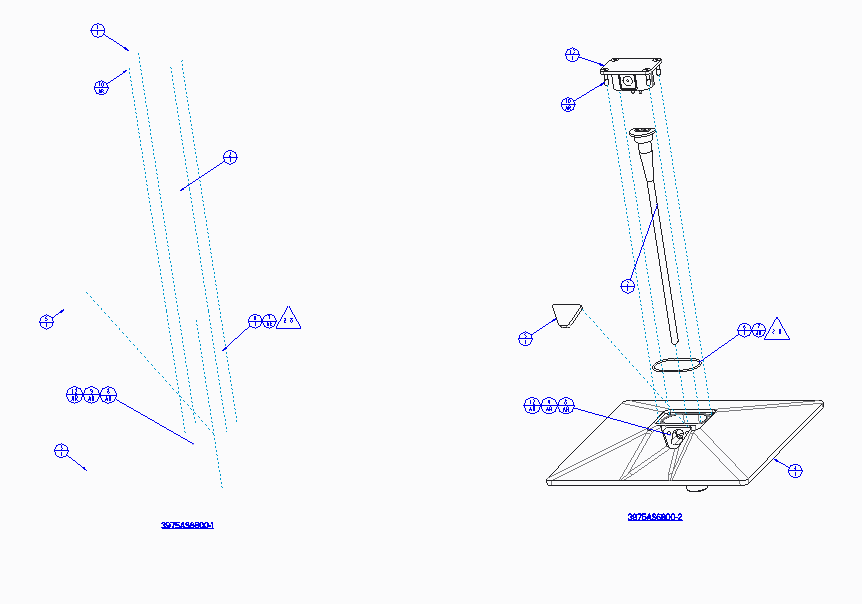
Capture.PNG

4 replies

17-Peridot
April 19, 2017

By any chance did you hide the Solids in a layer?

Looks like all the solid geometry is not displayed....

wfalco16-PearlAuthor
16-Pearl
April 19, 2017

No. I recreated the view and put the old one to the side to revisit later. But when I redid it..everything was visible. Only logical explanation is to turn of in a view layer. But I don't think that's an option?!

wfalco16-PearlAuthor
16-Pearl
April 19, 2017

Na. It deletes everything when I do that - as expected.

10-Marble
April 20, 2017

On some occasions I get something similar, for my config.pro option "auto_regen_views" is set to "no".

What happens when you click Review - Update Sheets or Review - Update Drawing View without switching to 3d and back?

wfalco16-PearlAuthor
16-Pearl
April 25, 2017

Andreas,

I came back after logging off and still same. Does not appear to be a regen isse. TX. I ended up redoing the view. I thing I deleted the bad one. So I guess it remain a mystery?

Wayne

bbrejcha
15-Moonstone
April 25, 2017

My bet is solids layer

Bart Brejcha

Design-engine.com

Bart Brejecha designengine.com
wfalco16-PearlAuthor
16-Pearl
April 25, 2017

I fiddled with layers, yada yada. Did not find a resolution. I think I deleted the view. So it may remain a mystery?