
1-Visitor
January 13, 2020
Solved

Offset Section View thru several holes (Creo 4.0)

  • January 13, 2020
  • 2 replies
  • 3317 views

Hello Creo experts... I was hoping to reach out for some detailing help.

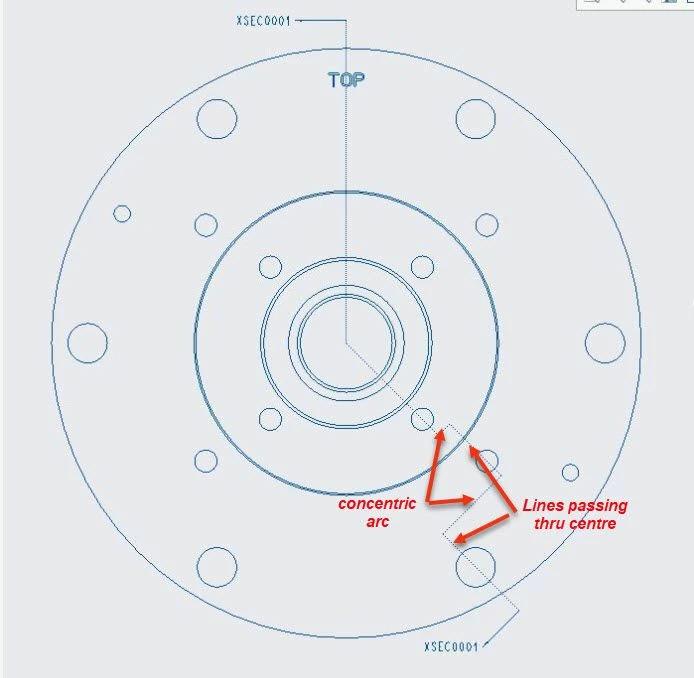
I have a part where several holes on different BC's need to be shown on an offset section view. If I do a offset section with only 2 lines, the view is fine but as soon as I 'jog' the section to go thru more holes, my offset section Full(Aligned) has geometry that is impossible to be erased. I have attached 2 images. 1 showing that if I have a relatively simple offset the section view is fine but as soon as I try to offset thru other features, the section view has extra geometry showing in the bore that I cant erase 😞
Best answer by manjunathrv

Try to change your sketch to something like attached. Sometimes this method works with the offset section.


2020-01-14_11-16-54.jpg

2 replies

23-Emerald III
January 13, 2020

For some reason, I have better luck when the x-section rotates the "other way".

Graphically like this:

StephenWilliams_0-1578926719710.png


Also check to make sure any cosmetics or sketches are hidden (or layers off) .

I've never seen this specific problem but i have seen some other unexpected things showing up.


17-Peridot
January 14, 2020

Try to change your sketch to something like attached. Sometimes this method works with the offset section.


2020-01-14_11-16-54.jpg

1-Visitor
January 14, 2020

Thanks for taking time to reply...changed as you suggested but still have the lines in the bore that wont erase 😞

1-Visitor
January 14, 2020

 not having the view as projected and RESULT!

Thank you!!!!