
12-Amethyst
August 19, 2022
Solved

Open a model & Notification center warning

  • August 19, 2022
  • 2 replies
  • 2008 views

Hi all


We use CREO 7.0.2.0 and windchill 11.1 M020-CPS20.
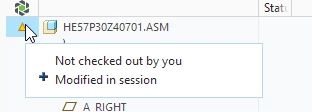
After added a model to a workspace and open it, sometimes we have a warning from the notification center, and a yellow triangle in our model tree. The message is as follow:
Dom_BOUCHARDY_0-1660902275623.png

I don't understand which function or parameter CREO want to update at opening.

I read the CS329894, but don"t find any enlightement
Where can i found this information?

Is there a model log somewhere?


Regards


Dom

Best answer by remy

Bonjour M. Bouchardy,


When adding a model to workspace Creo shows a warning beside some components in the model tree. You are surprised and need to understand the meaning of that warning.  This is a fair question.


First and foremost let's keep in mind that, like state by article CS329894, this message is harmless.


Secondly Creo anticipates a modification and is warning the user that a conflict exists with another user.

To prevent the loss work, the basics of a PDM, Creo kindly raises its hand to inform you that to continue the modification and make sure it will be checked in (maybe later) then the user had batter check-out the object for herself/himself.

If the user does not modify anything then the warning can be ignored or you could follow @TomU suggestion.

2 replies

23-Emerald IV
August 19, 2022

The notification center is not very intuitive.  In this particular case it's complaining about you opening (and probably modifying) an assembly without checking it out first.  If you don't care about these kinds of messages, you can turn them off here:

TomU_0-1660908664589.png


remy21-Topaz IAnswer
21-Topaz I
August 22, 2022

Bonjour M. Bouchardy,


When adding a model to workspace Creo shows a warning beside some components in the model tree. You are surprised and need to understand the meaning of that warning.  This is a fair question.


First and foremost let's keep in mind that, like state by article CS329894, this message is harmless.


Secondly Creo anticipates a modification and is warning the user that a conflict exists with another user.

To prevent the loss work, the basics of a PDM, Creo kindly raises its hand to inform you that to continue the modification and make sure it will be checked in (maybe later) then the user had batter check-out the object for herself/himself.

If the user does not modify anything then the warning can be ignored or you could follow @TomU suggestion.

12-Amethyst
August 22, 2022

Thanks all, again on this forum, your explanation are clear and helpfull. 🙂


Regards