12-Amethyst
September 19, 2022
Solved

Overwrite locked parameter in BOM

  • September 19, 2022
  • 3 replies
  • 5476 views

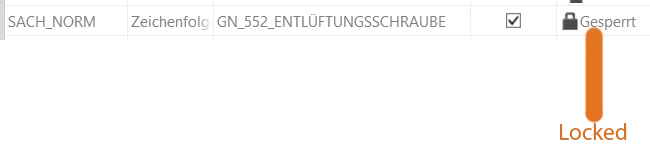
Hello, i have several parts that have locked paramters like this:
Screenshot 2022-09-19 182305.png

I cannot unlock this parameter and therefore I cannot change the value of it.

In the BOM in the drawing this parameter is linked. Is there a way to either unlock it or to overwrite this value in the BOM-table with a manual entry?

Greetings
Spedex
Best answer by MartinHanak

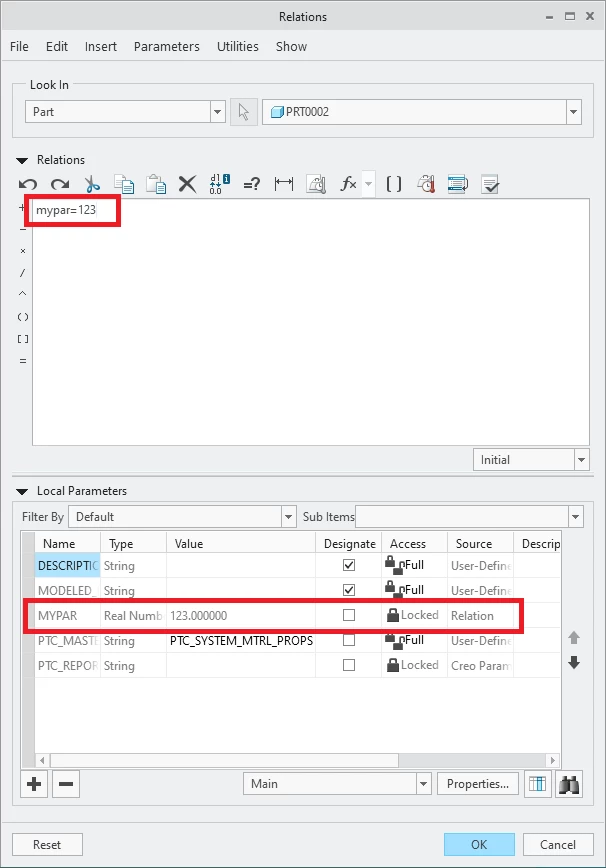
before

MartinHanak_0-1663684617607.png

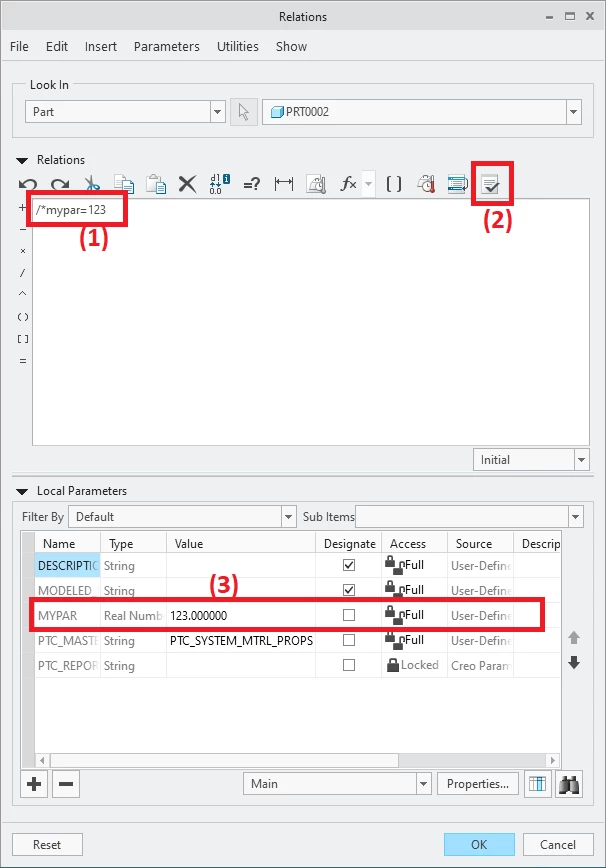
after

MartinHanak_1-1663684695941.png


3 replies

23-Emerald III
September 19, 2022

Find the source of the parameter that is causing it to be locked.

If the parameter is driven by a relation, change the relation formula or value.

kdirth
21-Topaz I
21-Topaz I
September 19, 2022

What is the Source of the parameter?

kdirth_0-1663617350065.png


Also here is a description of how to overwrite the value in BOM if needed:

* Use relation names for your table


CHANGING ITEM IN BOM TABLE 

  1. Select “Repeat Region” from “Table” tab 
  2. Select “Switch Syms” then “Done.” 
    1. If first item cell of column to be changed starts with “rpt.rel” go to 3. 
    2. Double click on first item cell 
    3. Select rpt… then rel… then User Defined. 
      1. Type in Relation name: 
        • PRTNUM for part number 
        • QTY for quantity 
        • NAME for Description 
  3. Select “Repeat Region” from “Table” tab 
  4. Select “Switch Syms” 
  5. Select “Relations” then select the table. 
  6. Enter text to make change required and select OK/Done. 
    1. Part Number change: 
      • IF asm_mbr_name =="S12345_XXX" 
      • PRTNUM="S12345" 
      • ELSE 
      • PRTNUM= asm_mbr_name 
      • ENDIF 
    2. Quantity change: 
      • IF asm_mbr_name ==”S12345” 
      • QTY="XXX" 
      • ELSE 
      • QTY=rpt_qty 
      • ENDIF 
    3. Name change: 
      • IF asm_mbr_name=="SA47662" 
      • NAME="XXX" 
      • ELSE 
      • NAME=asm_mbr_name 
      • ENDIF 
  7. Select OK 
  8. Select “Update Tables” from menu then Done.  
  9. Multiple changes in a column can be done by nesting IF statements: 
    • IF asm_mbr_name =="S12345_XXX" 
    • PRTNUM="S12345" 
    • ELSE 
    • IF asm_mbr_name =="S23456_XXX" 
    • PRTNUM="S23456" 
    • ELSE 
    • PRTNUM= asm_mbr_name 
    • ENDIF 
    • ENDIF 
      • One ENDIF for each IF statement 
There is always more to learn.
Spedex12-AmethystAuthor
12-Amethyst
September 20, 2022

So as source it says "relation":

pic3.png

Unfortunately my Creo Parametric 9.0 Student Edition is in German. Sorry for that.
I do know the relation actually, it is linked to the file name. So whenever I update the filename this parameter updates itself too.
The question is can I remove this relation so that afterwards I can freely edit this parameter?

Greetings
Spedex

23-Emerald III
September 20, 2022

Yes, if you delete (or comment out) the relation, it will "unlock" the parameter.

You can add /* to the front of your relation to comment it out to test.

Spedex12-AmethystAuthor
12-Amethyst
September 20, 2022

Thank you very much everybody.

I was able to fix the problem by deleting the relations.