
Dale_Rosema
23-Emerald III
23-Emerald III
September 22, 2023
Solved

Pagination Sheet 2

  • September 22, 2023
  • 4 replies
  • 3600 views

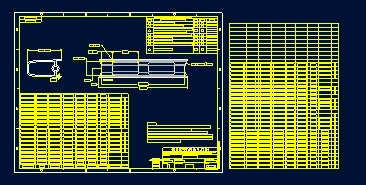
I just created another pagination, but this time I want the 2nd portion to be on sheet two.

Can someone walk me through this. Most of the search on this were over 10 years old.
Dale_Rosema_1-1695395981350.png


Best answer by Dale_Rosema

I found a way, but I ended up with a header and footer on sheet 1.


After the table paginates to 3 sheets, I re-paginate the table on sheet two (with a footer) and set the extents higher than the data I have. It extends the table on sheet 2 to the new extents, eliminating any data on sheet 3.


For now I am going to live with the header and footer on page 1  because I've spent enough time on this already.


Thanks everyone for nudging me closer to the solution found.

4 replies

kdirth
21-Topaz I
21-Topaz I
September 22, 2023

You should be able to LMB on table cell, select move to sheet from mini toolbar and select the sheet from list.

kdirth_0-1695405081368.png

kdirth_1-1695405097632.png


There is always more to learn.
Dale_Rosema
23-Emerald III
23-Emerald III
September 25, 2023

How do I get it just to move the new segment of the table to sheet 2?

It wants to move both. And when it does, it move the 1 segment to sheet two, then shortens the 2nd segment placed on sheet3, and adds the remainder on sheet 4.

23-Emerald III
September 25, 2023

I don't remember it being this difficult to manipulate but then again, I think I have always just paginated on the same sheet.

I cleared the pagination, then I moved the table to sheet 2, redid the paginate, then moved the 1st part back to sheet one.

What a mess. I don't know how you would handle more sheets?!?!

24-Ruby III
September 22, 2023

Hi,

when I was answering your 1st question, Creo created automatically new sheets when I applied Set Extent command.

Dale_Rosema
23-Emerald III
23-Emerald III
September 25, 2023

When paginating, can the second portion of the table have more rows than the first portions of the table.

I choose 18 rows for the extent of the table, and it automatically broke the table into two 18 row sections, and a remainder.

If you see from my original picture, if you put the second portion on sheet 2, since there is now model on that page, it could be longer to fill up the whole page.

Is there something that I am missing for this?

Dale_Rosema
23-Emerald III
23-Emerald III
September 25, 2023

To confirm this, I did a much shorter section 1 of the table and it broke the table into 5 sections.

24-Ruby III
September 26, 2023

Hi,

maybe you can create two identical tables -AND- apply filters on them. Filters will enable you to display 1st part of the list on 1st sheet -AND- to display 2nd part of the list on 2nd sheet.
