
1-Visitor
October 1, 2015
Question

Paintbrush Pictures Disappearing?

  • October 1, 2015
  • 2 replies
  • 6813 views

Hello All,


I am having a problem with paintbrush objects suddenly becoming invisible.
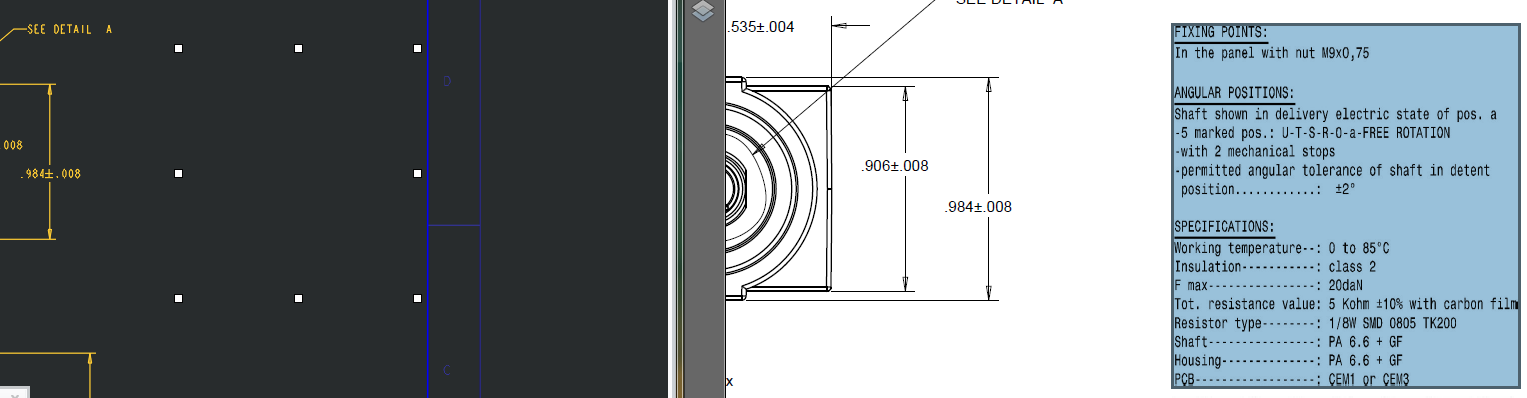
 

paintbrush invisible.PNG

The above screenshot shows the drawing open in Creo 2.0 next to an exported PDF. The same paintbrush object is highlighted in both, but the contents of the object are invisible in Creo. This makes working with objects quite tedious because I can't see how they look without exporting to another format.


Has anyone else experienced this issue?


This thread is inactive and closed by the PTC Community Management Team. If you would like to provide a reply and re-open this thread, please notify the moderator and reference the thread. You may also use "Start a topic" button to ask a new question. Please be sure to include what version of the PTC product you are using so another community member knowledgeable about your version may be able to assist.

2 replies

24-Ruby III
October 1, 2015

Jordan,

maybe the problem is caused by black text on black background. In Creo change background color to white temporarily to see, if this is true.

If picture is is not visible during test, then you can apply information available in https://support.ptc.com/appserver/cs/view/solution.jsp?n=CS76070 and https://support.ptc.com/appserver/cs/view/solution.jsp?n=CS43569

Suggestion: Instead of including a picture, create text note.

MH

1-Visitor
October 1, 2015

Were it so easy...

The picture is actually black text on a white background.Sorry, I guess I picked a bad example, here is a better one:

paintbrush invisible 2.PNG

It also shows why I can't just use a note.

I tried the linked support solutions but couldn't find anything wrong with my registry entries. And here's what happens when I try to use a Word document instead of a paintbrush picture:

word_object_edit.PNG

Works fine in edit mode...

word_object_closed.PNG

Turns invisible on close...

24-Ruby III
October 1, 2015

Jordan,

did you try to change Creo background color to white temporarily ?

Please create new empty drawing, include the picture and upload drawing + picture using How to attach file when you Reply to a discussion. for testing purposes.

MH


17-Peridot
October 8, 2015

I've had this problem since Pro|E... and still with Creo 3.

No rhyme or reason.  Restarting Creo seems to work.  Just cannot reproduce making it disappear.

I use a BMP file for a format title block logo.  Even when it is gone, it prints correctly.

One of those poor implementations that PTC is simply ignoring because it is so difficult to replicate but obviously there for many.