11-Garnet
August 7, 2024
Solved

Part - Copy Geometry - Bodies - Hide Copy Geom Feature

  • August 7, 2024
  • 1 reply
  • 1692 views

Hi,


i have a part where i am using copy geometry(external).  I put in the assembly i want to reference, deselect Publish Geometry, and then choose Bodies and select the body i want to reference.  


I want to hide the body when i'm all done.  Creo is not hiding the body.  I have created a new layer and hidden the layer but that isn't working either.  


See screenshot attached.  The Tubing should be the only piece that is visible.


Creo 8.0.10.0


Thanks



Best answer by kdirth

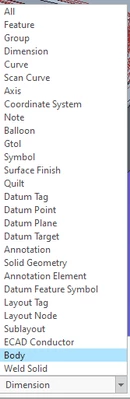
When adding the copied body to the layer, change the selection filter to body and select it in the window.

kdirth_0-1723119641977.png


1 reply

kdirth
21-Topaz I
kdirth21-Topaz IAnswer
21-Topaz I
August 8, 2024

When adding the copied body to the layer, change the selection filter to body and select it in the window.

kdirth_0-1723119641977.png


There is always more to learn.
jchance11-GarnetAuthor
11-Garnet
August 8, 2024

This 100% worked.  Not very intuitive!


Thanks so much!