
12-Amethyst
July 24, 2025
Solved

Part Template not found issue

  • July 24, 2025
  • 2 replies
  • 946 views

Hello,


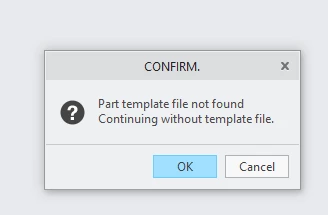
i am having a small issue, when i import a part, i am getting a error message that the part template is not found.

i have not changed any settings nor has anyone in the company changed anything either so im a bit baffled why the import function has decided to lose the default template
AnthonyC_0-1753340755225.png

anyone know how to check for the template or tell creo to search for it?


using Creo Parametric 6.0.6.0
 

Best answer by HF_CHINA

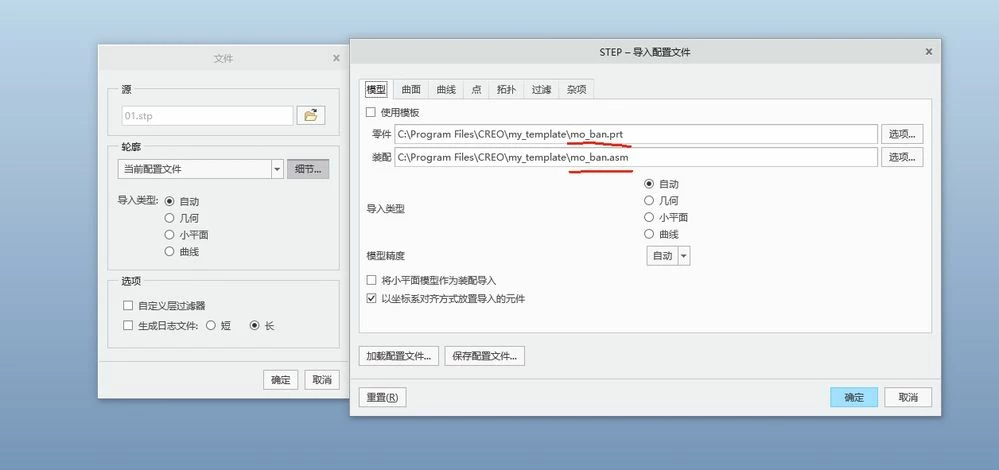
你好,发现你的配置文件后缀名有问题,(也就是你的配置文件格式有问题)2.jpg

2 replies

10-Marble
July 24, 2025

应该是你导入的时候选择了模板选项,而你本身是没有模板文件的,这就造成了找不到模板的提示2.jpg

AnthonyC12-AmethystAuthor
12-Amethyst
July 24, 2025

AnthonyC_0-1753354458231.png

Hello, thanks for helping. 

as you can see i have a profile and a template but despite that being enabled, as soon as i import it, the error message shows

HF_CHINA10-MarbleAnswer
10-Marble
July 25, 2025

你好,发现你的配置文件后缀名有问题,(也就是你的配置文件格式有问题)2.jpg

23-Emerald III
July 24, 2025

Have you set the import dialog to use a default template? It does not use your standard start part template.

Article - CS30943 - How to use a template part or assembly while importing different file formats like IGES/STEP in Creo Parametric

AnthonyC12-AmethystAuthor
12-Amethyst
July 24, 2025

Hi,


importing the step file to a default profile does not work well with us. depending on the source of the step file, we like to organise the import with the profiles.