8-Gravel
June 2, 2023
Solved

Partial selection of a curve plus a curve as one

  • June 2, 2023
  • 2 replies
  • 2316 views

Hello,


So I have those 5 curves, and I want to make a surface (with surface menu or boundary blend, either way is fine). Problem is surface is not responding to select those 5 curves together, and rightly so due to their positions and they "estimated-by-my-eye" result that it would come out.


The closest thing to a solution is to take 2 of those 5 curves, and then use the rest as guides. Which works up to a point BUT...


5 curves are not full ones. 3 of the 5, are partial ones, I want to select them from up to a point. Also it is worth noting that those curves are all boundaries of the desired surface. 


1. I connect 2 surfaces. One is partial, one is full curve. All fine so far.

2. I add one partial one at the left boundary. Still fine, surface closes in to the desired shape.

3. I have to add 2 curves, as right boundary for the right side. One of which is also partial. Either way, partial or no partial, CREO does not accept 2 curves to be recognised as one and added as boundary or guide curve.


(all connections and points are snapped properly)


Any idea?


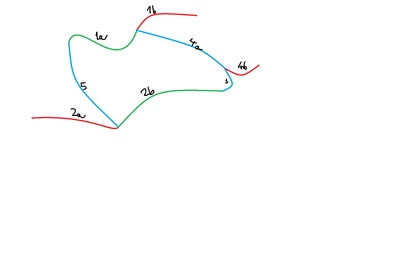
Image for better demonstration:

Red is not used and is left out of the partial loop.

Green is selected to create the surface.

Blue is the  guide curves.

I keep the same number for the same curve.

I change the letter when something is left out, from selection. It is still the same curve though.
creo_ref.png

Thanks in advance.


Best answer by kdirth

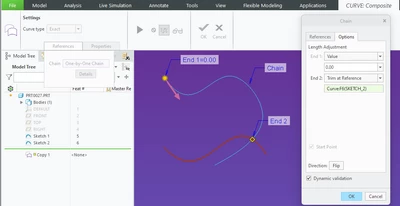
Making the trimmed copy leaves the original in place.


  • Select the original
  • Ctrl+C
  • Ctrl+V
  • Select References drop down then Details
  • Select Options tab
  • Select drop down for end you wish to trim, select Trim at Reference and select object to trim at.
  •  Complete feature.

kdirth_0-1686056035734.png


2 replies

24-Ruby III
June 2, 2023

Hi,

please upload your model.

Note: It seems to me that some curves have tangent connection with others. I guess that is not allowed.

PantelisP8-GravelAuthor
8-Gravel
June 6, 2023

There is no file. I just do tests for educational purposes.

kdirth
21-Topaz I
June 2, 2023

Tangent curves do need to be part of the same side of the surface.


To use 4a with 3 you will need to make a copy of 4 trimmed to 3 first.

There is always more to learn.
PantelisP8-GravelAuthor
8-Gravel
June 6, 2023

What if I want to use 4 for something else so I cannot trim it off? Is there any way to duplicate 4 in place, trim it to 3 as suggested? Also after trimming 4 to 3, can I connect 3 and 4? I don't think I have seen such commands in creo.

kdirth
kdirth21-Topaz IAnswer
21-Topaz I
June 6, 2023

Making the trimmed copy leaves the original in place.


  • Select the original
  • Ctrl+C
  • Ctrl+V
  • Select References drop down then Details
  • Select Options tab
  • Select drop down for end you wish to trim, select Trim at Reference and select object to trim at.
  •  Complete feature.

kdirth_0-1686056035734.png


There is always more to learn.