
16-Pearl
January 15, 2021
Solved

Parts with different units of measure

  • January 15, 2021
  • 2 replies
  • 4375 views

Hi everyone, I have a customer who created an assembly with parts that have different units of measure. Is there a way to know the unit of measurement of all the parts without having to open them one by one? Another thing: once I know what they are, is there a way to change the unit of measurement of these parts without doing it one by one? Thanks, Matteo.
Best answer by rzukowski

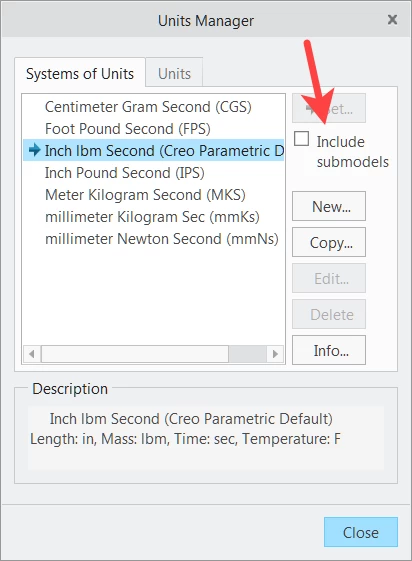
In Creo 4.0, there is an option to include submodels when changing the units.  Do this from the top level assembly.

units.png

2 replies

Chris3
21-Topaz I
January 15, 2021

Simulate will list them and also allow you to convert them.

123.png


If for some reason you don't have access to Simulate then you can also see them by setting 

mp_calc_level all_models

And then running a mass report. This will list the units next to the mass properties. The only way to convert them all in one fell swoop however is to use Simulate. Note that you don't actually need to do any analysis, the dialog box shown above prompts before you actually do any analysis and then you can exit right after doing the conversion.

16-Pearl
January 15, 2021

Ok, thanks this method works. Unfortunately the customer does not have the software simulate. Do you know if you can do the same with model check?

Chris3
21-Topaz I
January 15, 2021

Unless you have an old license plan, Creo Simulate comes with the base T1 license. I am not a model check expert so I don't know if Model Check can do it.

rzukowski13-AquamarineAnswer
13-Aquamarine
January 15, 2021

In Creo 4.0, there is an option to include submodels when changing the units.  Do this from the top level assembly.

units.png