

1-Visitor
February 21, 2013
Solved

Pattern question - how is it defined internally in Creo?

  • February 21, 2013
  • 3 replies
  • 1817 views

If I have a pattern of features in a part, is the patterned feature rebuilt every time?

Or is it a copy of the base feature that is placed in a pattern?

For example:

I have an axial pattern of an intersection. The intersection is between a datum plane that rotates around an axis with a surface.

What I expected: the datum plane is rotated around the axis (for example 20 times, angle 2° inbetween). For each datum plane, the intersection between the current datum plane and the other surface is drawn.

What really happens in Creo: The first intersection is drawn, this intersection line is patterned 20 times around the axis.

If the axis is not parallel to the surface, the intersection shifts away...
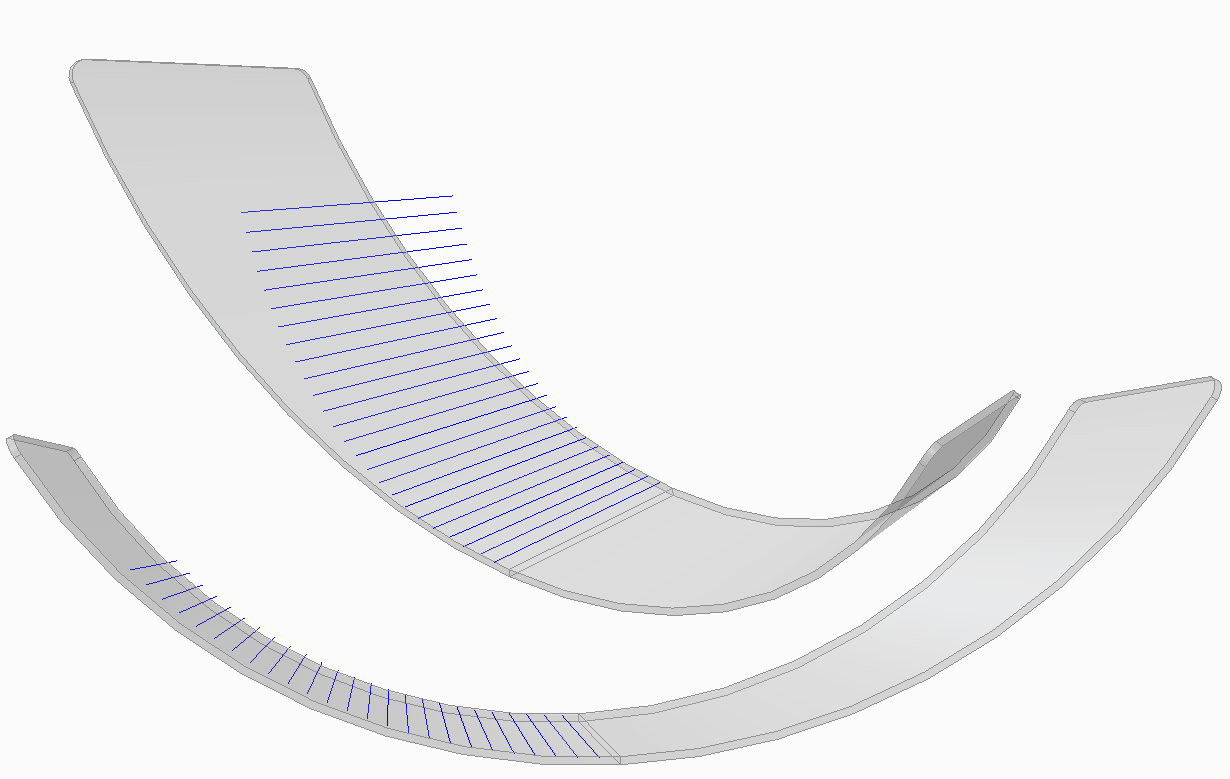
pattern.png

Is this normal behaviour?

Or something I have to do in another way to get what I want?

Or is my idea of a pattern not possible in Creo?


This thread is inactive and closed by the PTC Community Management Team. If you would like to provide a reply and re-open this thread, please notify the moderator and reference the thread. You may also use "Start a topic" button to ask a new question. Please be sure to include what version of the PTC product you are using so another community member knowledgeable about your version may be able to assist.
Best answer by JonathanHodgson

How exactly have you patterned the feature?

Have you created one plane, then an axis on the intersection, then axis-patterned the axis; or have you created a plane and an axis, patterned the plane and then reference-patterned the axis?

3 replies

13-Aquamarine
February 21, 2013

How exactly have you patterned the feature?

Have you created one plane, then an axis on the intersection, then axis-patterned the axis; or have you created a plane and an axis, patterned the plane and then reference-patterned the axis?

Jeroen1-VisitorAuthor
1-Visitor
February 21, 2013

I tried 2 things: a projection and an intersection. Both give the same result.

To explain what I did for the intersection:

- I first created the intersection by creating a plane through an axis, and selecting it together with the surface.

- Then I patterned it by selecting the intersection and the same axis as before.

I tried your idea about the reference patterns, ant this works!

Thank you very much!

13-Aquamarine
February 21, 2013

Glad to be of assistance!

If you just select the intersection feature and pattern it about an axis, it will simply take that geometry and rotate it about the axis you selected.

If you want to re-calculate the geometry at each point, then you have to pattern the geometry that's used to create it - in this case the plane.

Reference patterns are often very useful.