Dale_Rosema
23-Emerald III
August 29, 2022
Solved

PDF settings

  • August 29, 2022
  • 1 reply
  • 1712 views

When saving/exporting pdf's, is there a way to have the settings such that the .pdf is save with "Fit to Height". That way, when the .pdf is opened, it will be already set as "Fit to Height"?

Best answer by Dale_Rosema

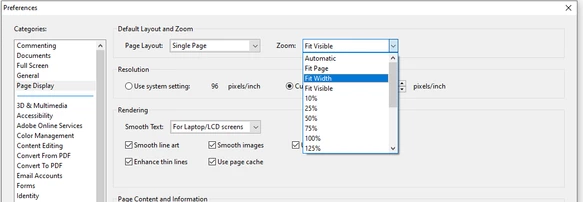
Initially I could not find Fit to Height on the Page display.


Dale_Rosema_0-1661779790380.png


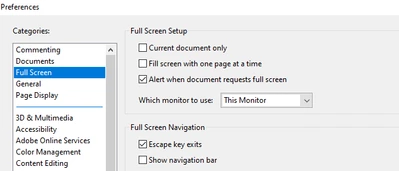
But on the Full Screen, you need to uncheck Current document only,


Dale_Rosema_1-1661779937521.png


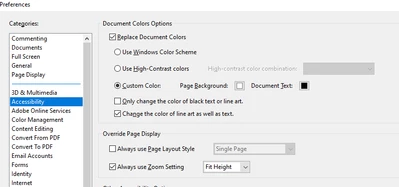
Then in Accessibility you need to check Always use Zoom Setting and select Fit Height


Dale_Rosema_2-1661780054332.png


Now all the documents open Fit to Height.


I messed with this for hours last week and even had the IT guy look into it. I'll mark it as answered for now, but will let you know if anything reverts back.

Thanks,

Dale

1 reply

23-Emerald IV
August 29, 2022

I don't think so.  You can set your own installation of Adobe Acrobat to automatically open all pages that way if you want though.

Dale_Rosema
23-Emerald III
August 29, 2022

But can you do that with only Acrobat Reader? I haven't found a way to automatically do that. Change it yes, but open it - not yet.

23-Emerald IV
August 29, 2022