

1-Visitor
October 23, 2017
Solved

Pin connection definition is incomplete (but isn't?)

  • October 23, 2017
  • 3 replies
  • 9551 views

Hi,

I am trying to connect two cylindrical shapes with a pin connection so one rotates around the other. I added the Axis alignment and the translation surfaces but Creo still says the connecition is incomplete. I am also not able the flip the connection. Can anyone tell me what is going on and how to fix this?


Kind regards,

Nine
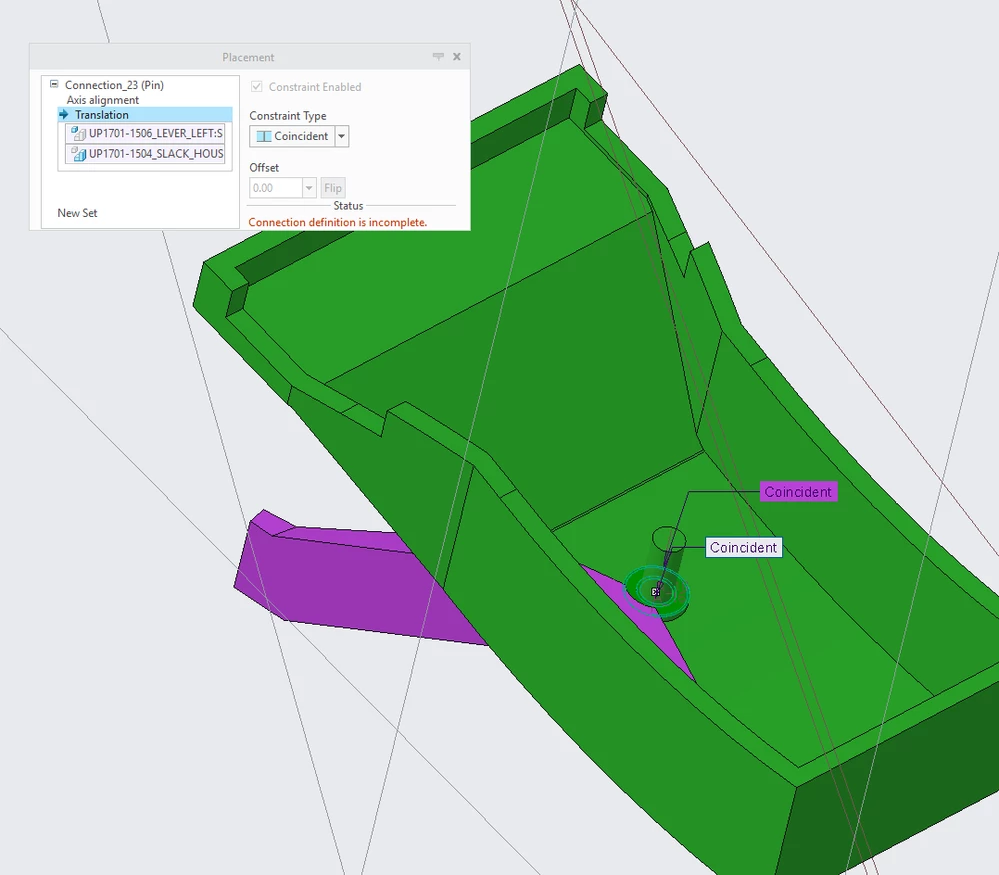
 

pin connection problem.PNG


Best answer by MartinHanak

Hi,


I do not have Creo Parametric 4.0 M010 installed, therefore I used Creo Parametric 4.0 M030.


1.] I unzipped your file

2.] I renamed parts (the assembly needs this)

3.] I edited definition of up1701-1506_lever_left.prt

  • I set Pin constraint
  • I selected two axes
  • I selected two planar faces
  • pin connection was created successfully
  • to see references, edit definition again

4.] I edited definition of up1701-1507_lever_right.prt

  • I set Pin constraint
  • I selected two axes
  • I selected two planar faces
  • pin connection was created successfully
  • to see references, edit definition again

See attached data.

3 replies

1-Visitor
October 23, 2017

Good afternoon!

Probably, because you leave 1 degree of mobility - which in itself is not a fixed object. If you exclude rotation around the axis - the part will be completely corrected.
I can be wrong, because now there is no way to check it.

Sincerely, Evgrafov Alexandr.

(using online translator)

1-Visitor
October 23, 2017

Hi,


The red part is constraint with a "Default" so it is completly fixed. Here I used the pin connection but I also tried a coincident on two axis and a coincident with two perpindicular (to those axis) surfaces, which didn't work either.


I added the files, in case someone has time to check them.


Kind regards,

Nine

24-Ruby III
October 23, 2017

Hi,


I do not have Creo Parametric 4.0 M010 installed, therefore I used Creo Parametric 4.0 M030.


1.] I unzipped your file

2.] I renamed parts (the assembly needs this)

3.] I edited definition of up1701-1506_lever_left.prt

  • I set Pin constraint
  • I selected two axes
  • I selected two planar faces
  • pin connection was created successfully
  • to see references, edit definition again

4.] I edited definition of up1701-1507_lever_right.prt

  • I set Pin constraint
  • I selected two axes
  • I selected two planar faces
  • pin connection was created successfully
  • to see references, edit definition again

See attached data.

24-Ruby III
October 23, 2017

Hi,


maybe pin references are not correct.


Suggestion: Create test assembly containing two simple cylindrical parts and test pin connection creation.

1-Visitor
July 31, 2020

Hi,

I'm posting  a message on this solved question because I get the same error on creo 7. My Pin connection is said to be incomplete but it isn't. I followed the  previos steps and still can't make my assembly working. Also, I have this message for all types of connections.

The last things is that when I run creo, I get this message : 

Failed initializing following services :

- 715db4df-2d3f-48b1-a37c-76142da3116c

- 8fd84892-af44-4065-8653-7c673a6ee021

Thank you if you know anything about this problem.

1-Visitor
October 30, 2022

My guess is you used datum features from another part to define the connection type. For example in a pin connection, you might have aligned the axis correctly but for the translation you probably picked the front plane from the main assembly (or another part) instead of the front plane of the specific part you are connecting to. So in this case the error kina makes sense since it only wants dependencies on the part you are connecting to. This was my issue at least.

Hope this helps.