1-Visitor
November 16, 2011
Question

Printing in Creo View

  • November 16, 2011
  • 6 replies
  • 19914 views

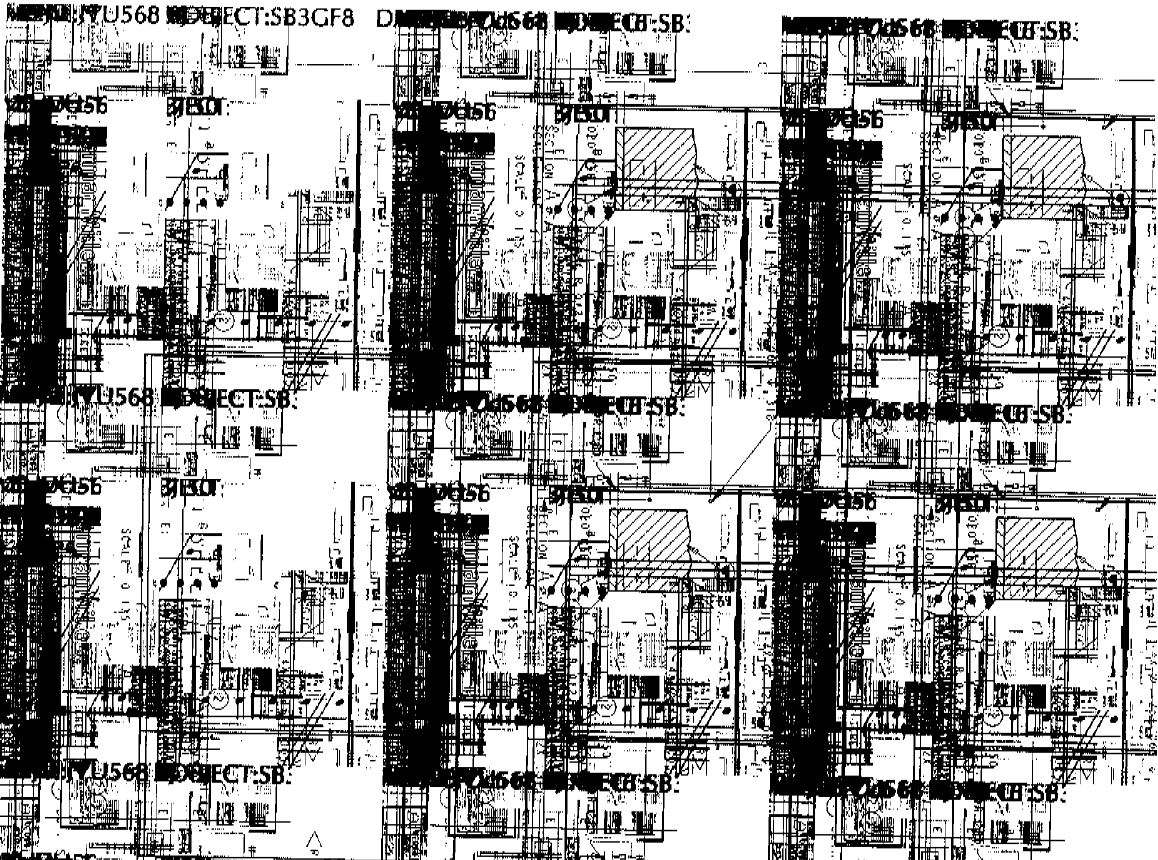
I have a customer that is trying to print a 2D model in CreoView. When he prints is prints in blobs of model. We have tried multiple printers for this user and still it is printing the same. We have tried changing the driver, printing to PDF and they all turn out the same. I have attached a picture of the model we are trying to print and the output that comes out of the printer. Has anyone experienced this before?Original.jpgPrinting from CreoView.JPG

This thread is inactive and closed by the PTC Community Management Team. If you would like to provide a reply and re-open this thread, please notify the moderator and reference the thread. You may also use "Start a topic" button to ask a new question. Please be sure to include what version of the PTC product you are using so another community member knowledgeable about your version may be able to assist.

6 replies

24-Ruby III
November 17, 2011

Hello!

Are you using Creo View Express or Creo View Lite (and which service release)?

1-Visitor
November 17, 2011

Express 1.0

24-Ruby III
November 17, 2011

Could you attach a example?

1-Visitor
November 21, 2011

I am having the EXACT same issue as well... And one other user in my office as well. I emailed PTC support, and have crossed my fingers.

If someone found a resolution, please share.

1-Visitor
January 3, 2012

What type of video card is on the machine you are having issue with?

1-Visitor
January 3, 2012

There are multiple PC’s here with this same issue, so I assume we all have the same or similar video cards…

My PC says it’s an “Intel Q965/Q963 Express Chipset Family”, It’s part of a Dell OptiPlex 745.

This is a really bad bug... it's basically ruined Creo for our entire Engineering department, Many are wanting to go back to another tool, but Creo would be much better if it could print.

Thanks for any help you can offer.

1-Visitor
May 22, 2013

We have had this problem since installing Creo View. We have tried updating drivers, bios, clearing cache, etc... No Success. We are only noticing it on older PCs using XP. Windows 7 seems to be working good.

We have help desk calls into PTC as well. This could have been a great thing for us as we upgraded to Windchill 10.1

If anyone has any success and can eliminate printing the checker boards, please share your success story.

1-Visitor
June 4, 2013

Christopher,

This problem is caused by a bug in the Intel graphics drivers - the CreoView print engine makes use of the graphics chip. If the computer is running Windows XP you can disable graphics hardware acceleration -- which oddly enough doesn't seem to degrade graphics performance, at least not that I've seen. We usually see this problem on Dell computers with Intel graphics.

Try setting the environment variable PV_OFF_SCREEN_SIZE_LIMIT on the client computer to a value of 2048. You will need to close and re-open Creo View after setting this variable, but it should solve your problem.

Brian Geary

http://windchill101.com

1-Visitor
June 13, 2013

I tried changing the PV_OFF_SIZE_LIMIT and it did not work.

1-Visitor
June 21, 2013

Please double check your variable name, the one you typed above doesn't match the recommended name. Setting PV_OFF_SCREEN_SIZE_LIMIT = 2048 has fixed this problem on all of our machines with Intel graphics. This works on both Windows XP and Windows 7.

Brian Geary

http://windchill101.com

1-Visitor
January 22, 2014

We also have had these goofy issues with printing,, Shown above, or blank screen... This started happening when we switched from raster to PDF publishing.

I appears to me that the publisher was set for 300 dpi, and anything above that looks like this as far as viewers go. I finally figured out to change the local PDF viewer/printer to 300 dpi, and this resolved this issue for all users.

1-Visitor
January 23, 2014

I tried to change the dpi to 300 and lower. Still no success.

1-Visitor
January 23, 2014

Do you have Adobe, or Nuance or PDF set up as a system Printer.. i.e. Set up as a printer? That needs to be set up with the dpi at 300. See below image.

If so, run a test by Printing to it with a preview and see if that works.

Just changing a viewer will not do it, from what I have seen.

PDF+printer.jpg

18-Opal
October 21, 2015

Hi Christopher,


If one of the responses helped resolve your issue, would you please mark it as the Correct Answer?  That way other users visiting the discussion will know; as the correct answer gets copied right below the question.


Thanks,

Amit