

Pro/Program Fails Following 'Publish to CAD'
Hi,
We'd like to take advantage of the Windchill 'Publish to CAD' functionality, which allows a CAD structure to be driven from a WTPart structure, however we're hitting a regular problem where a part with dependencies is removed from a structure. Steps to recreate the problem...
1) Create a Creo assembly of 2 sub components, with the 2nd component assembled to the 1st...
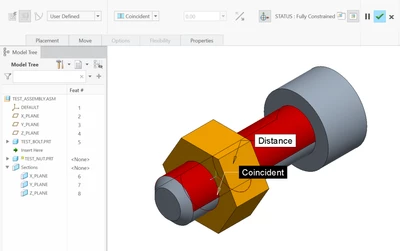
2) Create WTParts for all components, and build the WTPart structure...

3) Remove the 1st component from the WTPart structure, and use 'Publish to CAD' or 'Compare to CAD Structure' to drive the changes into the CAD structure...

4) Open the updated CAD structure in Creo, the changes are correctly shown...
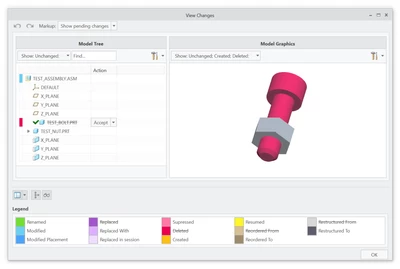
Everything works correctly until this point, however after accepting the changes, Creo reports an error and rolls back the changes...

It seems Creo is unable to deal with a component being removed where it has a dependency (assembly constraint, sketch, datum, xsec etc.), this would seem like an obvious situation that would be dealt with by just leaving the dependency as a failed feature, so hopefully this is just a config setting that's causing it to error. Running Creo 5.0.3.0, unfortunately this outside the extended supported period so we have been unable to get any PTC suggestions.
Is anyone able to recreate this issue (successfully or not)?
Thanks in advance.